What does the Wait for Time node do in Votel?
Wait for Time pauses a workflow before the next step. It has three timing modes: a fixed duration such as 30 minutes or 3 days, a specific date that can come from a contact field, and a time offset relative to a date field, like 24 hours before an appointment. Contacts stay in the workflow while they wait.
When should I add a wait to a Votel workflow?
Use it to create deliberate spacing between helpful follow-ups.
Working example
Working example: a one-minute wait, then a follow-up. Tested in the Votel workflow simulator on October 19, 2026 with a synthetic contact. The simulator logged "Wait duration skipped (test mode): would wait 1 minutes" and moved straight on, so test mode does not show real wait timing or time zone handling. Follow Up Later then refused to schedule anything. Set to Same channel, it said the account has no active phone number to call from. Set to Email, it said no email channel is configured that can send. Both times the test panel stayed on Follow Up Later until we ended it. Nothing was scheduled or sent.
Manual trigger → Wait For Time (1 minute) → Follow Up Later (after 1 day) → End
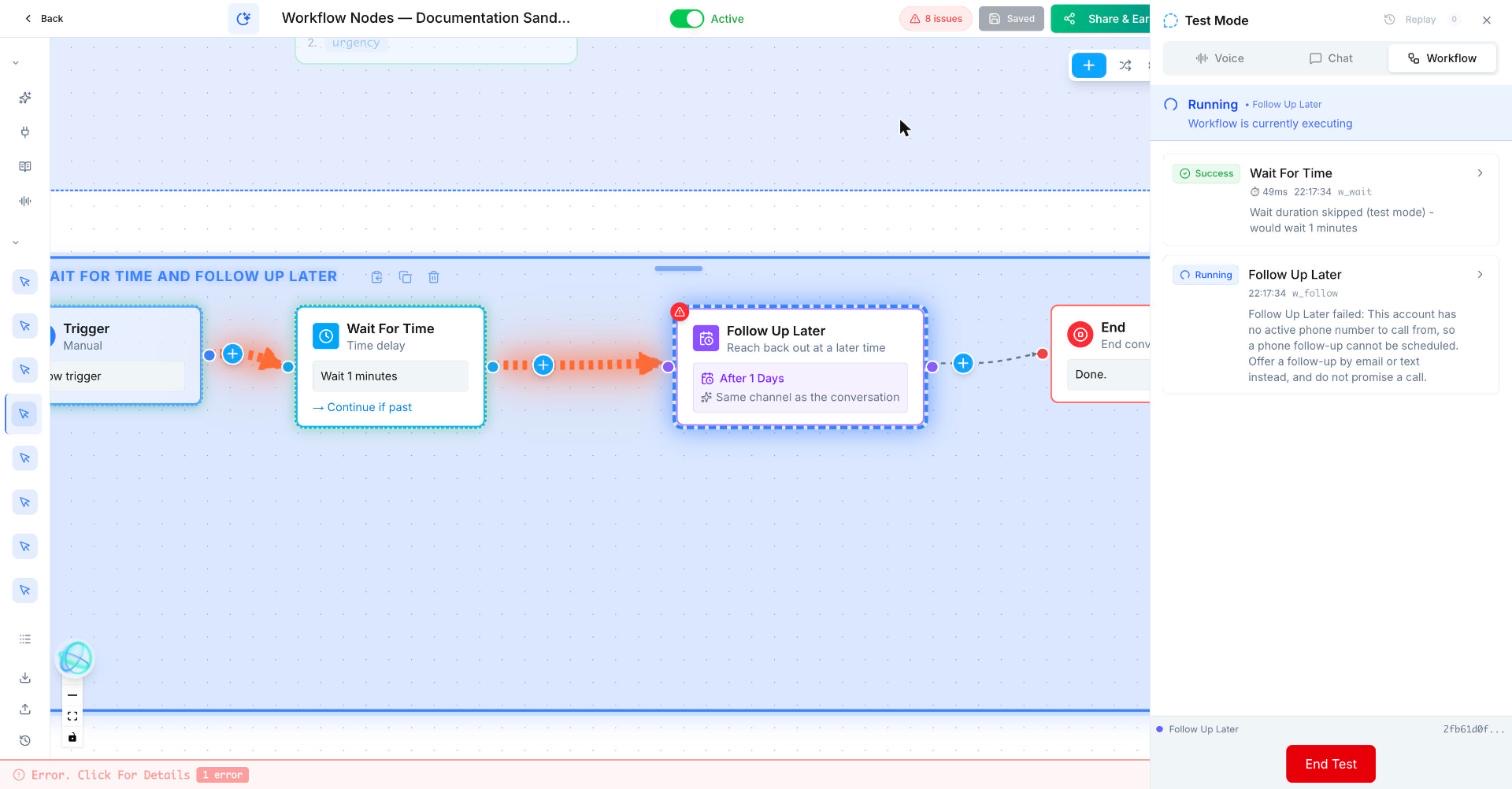
Trigger: Manual
Wait For Time: Fixed duration, 1 minute
Follow Up Later
  Timing: After a delay, 1 day
  Default time of day: 10:00 AM
  Channel: Same channel as the conversation (second run: Email)
  Message: Hi {{contact.first_name}}, this is a sandbox test reminder. No reply needed.
  Cancel if the contact gets in touch first: on
EndWhat does a timed follow-up look like?
A prospect who misses a call receives one SMS two hours later during business hours, not three messages immediately.
How do I set up Wait for Time in Votel?
- Choose the delay or time window and confirm the time zone.
- Check that a later message still makes sense before sending it.
- Add a stop condition for a reply, booking, or DND request.
- Keep the sequence short and easy for a person to understand.
Step by step, from Votel's docs
- Pick the counter type: Fixed Duration, Wait Until a Specific Date, or Time Offset.
- For a date, use a contact field variable so each contact gets their own schedule, such as a birthday.
- For reminders, offset from a date field, for example 24 hours before the appointment date.
- For a drip, chain waits between actions. The docs' example: SMS on day 1, wait 2 days, call, wait 4 days, email.
- Add conditional logic so a contact who replies can exit before the timer runs out.
What timing modes does Wait for Time have?
| Counter type | What it does | Example |
|---|---|---|
| Fixed Duration | Pauses for an exact length of time, then resumes automatically. | Wait 30 minutes after a missed call, then send an SMS. |
| Wait Until a Specific Date | Pauses until a calendar date, which can come from a contact field. | A birthday or anniversary follow-up. |
| Time Offset | Waits until a time calculated from a date field. | A reminder 24 hours before an appointment. |
What about Follow Up Later?
Follow Up Later appears in Votel's builder under Scheduling. docs.votel.ai has no page for it as of October 19, 2026, so this comes from the builder and our sandbox run that day. You choose when (After a delay, with a default time of day of 10:00 AM), a channel (Same channel as the conversation, SMS, Email, Phone call, WhatsApp or Social message), a message or a short note on what the follow-up is about, and whether to cancel it if the contact gets in touch first. The builder says times are read in the contact's time zone and moved into 9am to 8pm local. In our sandbox, with no phone number or email sender connected, it refused to schedule and said why. Until Votel documents it, the documented route for timed follow-ups is Wait for Time followed by an SMS, Email or Outbound Call node.
What should come after a wait?
After this block, use an SMS, Email, Outbound Call, or Decision that checks whether follow-up is still needed.
When should I not use a wait?
Avoid it for urgent work that needs a person now.
A wait holds a contact in place. If someone needs a person now, a wait only makes that worse, so route to Call Forwarding or a task instead.
Why didn't my Votel wait step fire when I expected?
- The date field was empty. Date and offset modes read a contact field. Check the test contact actually has a value.
- The offset time had already passed. The docs do not say what happens when "24 hours before" is already in the past, for example a booking made for tomorrow morning. The node card in the builder shows a "Continue if past" label, which suggests a setting for this case. We have not tested it, so test that case.
- The timing is off by hours. docs.votel.ai does not say which time zone Wait for Time uses, and the test panel cannot show you: in our October 19, 2026 sandbox run it skipped the wait and logged "Wait duration skipped (test mode)". Check timing on a real run with a test contact and compare the timestamps.
- A contact who replied still got the follow-up. There was no early exit. Add conditional logic, or have the workflow that detects the reply use Deactivate From Workflow, which cancels waiting timers.
Frequently asked questions about Wait For Time & Follow Up Later
What timing modes does the Votel Wait for Time node have?
Three: Fixed Duration for an exact length of time, Wait Until a Specific Date, and Time Offset for a time relative to a date field.
Can a wait be based on a contact's appointment date?
Yes. Use Time Offset against the appointment date field, for example to send a reminder 24 hours before.
What happens to a contact while they wait?
Votel's docs say contacts remain in the workflow while waiting and are not affected by other instances of the same workflow during that time.
How do I stop a follow-up if the contact replies?
Combine the wait with conditional logic so the contact exits early, or use Deactivate From Workflow from the workflow that detects the reply. It cancels waiting timers for that contact.
Can I test Wait for Time in the Votel simulator?
Not the timing. In our sandbox run on October 19, 2026, the workflow test panel skipped the wait, logged "Wait duration skipped (test mode)" and moved straight to the next step. Use a real run with a test contact to check delays and time zones.
What does Follow Up Later need before it can schedule?
A channel that can actually send. In our sandbox run on October 19, 2026, with no phone number or email sender connected, Follow Up Later refused to schedule a call or an email and said why. Connect the channel first, then test with a contact you own.
Sources: Wait for Time Node, Deactivate from Workflow Node on docs.votel.ai, checked October 19, 2026. Where the docs are silent, this page says so instead of guessing.
Before you publish or activate: verify the current builder labels in Votel and test with dummy data. This independent guide describes the purpose and a safe setup approach; it does not replace Votel’s current product documentation or compliance advice.
Related blocks
- SMS & Email: Sends a prepared message to the contact through the channel that makes sense for the moment.
- Outbound Call: Places a call and gives you separate paths for answered, no-answer, voicemail, and failed calls.
- Decision: Checks a clear rule and sends the workflow down the matching path.