Complete the Votel setup and texting approvals before requesting the number transfer. Set up Votel and a temporary backup number, submit the Brand registration, wait for Brand approval, then submit the Campaign registration. Once the Campaign is approved, request the HighLevel-to-Votel transfer. Your established number can continue working in HighLevel while those preparations are completed.
It is the registration U.S. mobile carriers require when a business uses a regular local 10-digit number to send application-based text messages. It affects SMS and MMS, not ordinary voice calls. In this move, you should expect to register the business and texting campaign again through Votel.
Inventory the current number
Capture the setup you need to rebuild and identify who currently controls the number.
- Record the number in full format, including country code.
- Record the HighLevel sub-account and Location ID.
- Confirm whether it uses LC Phone, HighLevel’s built-in phone service, or a Twilio account you own.
- Document call routing, forwarding, hours, voicemail, caller ID, workflows, and average call volume.
- Record the current A2P brand, campaign, consent process, opt-outs, and do-not-disturb data.
If the number was purchased and managed directly inside HighLevel, it is commonly an LC Phone number. If your business connected and pays for its own Twilio account, use the customer-owned Twilio path. Ask HighLevel Support to confirm before submitting the move.
Do not delete it, disable the source phone service, disconnect Twilio, or cancel HighLevel. A supported transfer keeps the number assigned while ownership changes.
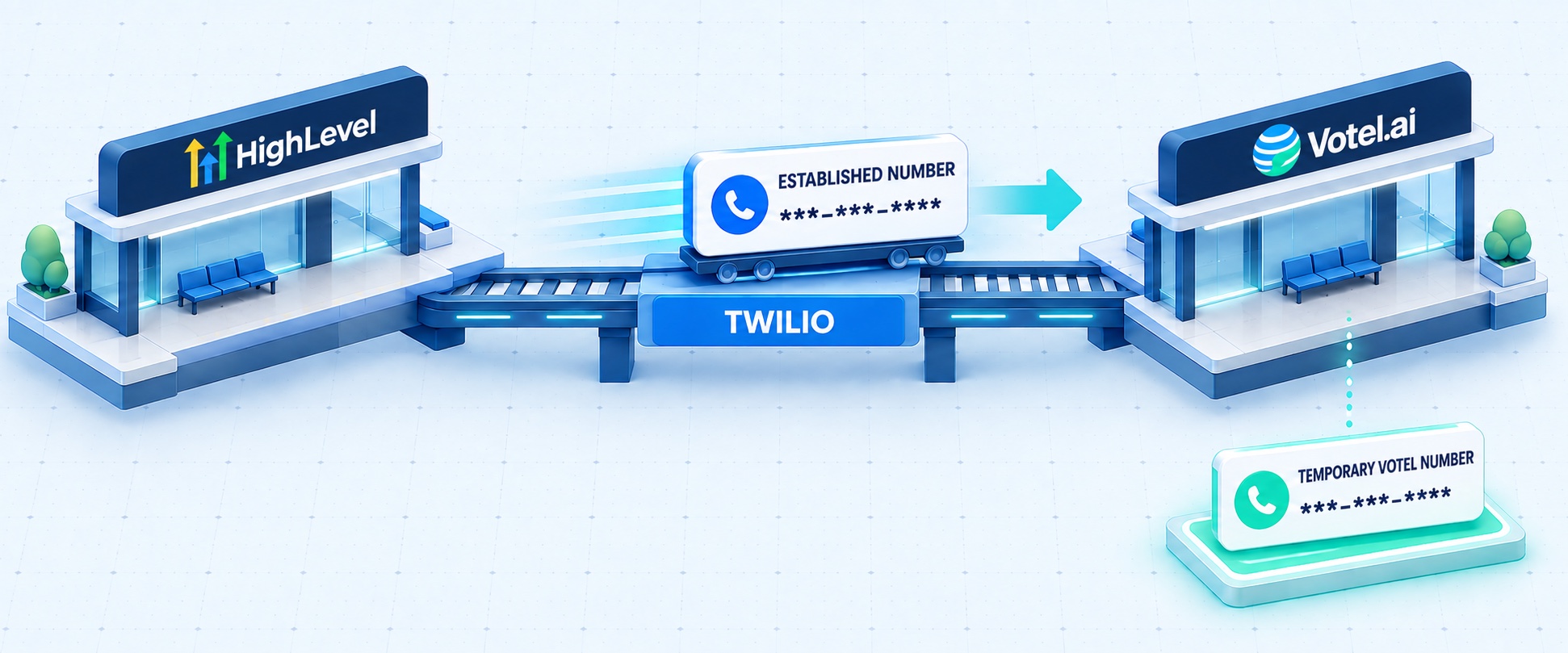
Buy a temporary number in Votel
Create a working backup number before touching the one your customers already know.
- Buy a new number inside the correct Votel business or sub-account.
- Assign it to the intended AI agent, team member, or call destination.
- Build business hours, voicemail, forwarding, and human handoff.
- Test the number from an outside phone.
- Decide how customers will find it if you need the backup. Prepare website, ad, email, social, and customer-support updates in advance.
The planned cutover may take only minutes or a few hours. Unexpected routing, approval, or account-assignment problems can take longer to resolve. If the interruption stretches from a few hours into a few days, the temporary Votel number gives the business a tested way to keep receiving calls.
Simply buying the number is not enough. Know which pages, ads, messages, and team members will share it during an extended interruption. Call forwarding may provide a voice bridge before the transfer if your setup supports it, but two-way SMS conversations sent to the original number do not automatically forward.
Register for A2P 10DLC again
You can keep the established phone number, but its existing business-texting approval does not move with it.
Understand the three A2P layers
Submit the Brand registration first. After the Brand is approved, submit the Campaign without waiting for the established HighLevel number. When that number transfers into Votel, connect it to the approved Campaign and wait for its number-level registration to complete before using it for texts.
It is not required for the Brand or Campaign application. It gives the business a tested calling channel if the final number transfer or routing takes hours, extends into the next day, or requires support to resolve an unexpected issue.
Prepare these items
- Legal business name, address, and EIN or tax ID
- Authorized representative information
- Public business website
- Clear description of how customers agree to receive texts
- Public privacy policy and terms pages
- Realistic sample messages that identify the business
- Opt-out language such as “Reply STOP to opt out”
Votel calls Brand and Campaign registration the two-part process. The phone number is the final connection. Each local number used for business texting must be registered to the approved Campaign before it sends messages.
The phone number may be ready for calls while outbound texting is still pending. Twilio currently advises allowing roughly 10 to 15 days for a straightforward Campaign review. Registering the individual phone number starts after Campaign approval and may not be immediate. Rejections and regulated industries can take longer.
Build and test Votel in parallel
Prove the destination before moving the number customers already know.
- Place an inbound call from an unrelated phone.
- Place an outbound call and check the caller ID shown.
- Test the AI agent, human transfer, no-answer path, after-hours behavior, and voicemail.
- Test inbound and outbound SMS after the temporary number is approved for messaging.
- Confirm the correct contact and activity appear in Votel.
- Confirm every related workflow runs exactly once.
The complete call experience works reliably on the temporary number. Do not schedule the established-number cutover before this is true.
Ask Votel to prepare for the number
Votel needs to confirm where the number will go and who will approve its arrival.
Ask Votel Support to confirm:
- Votel can receive the established number.
- The receiving Twilio Account SID, which is the destination account identifier support will use.
- The Votel sub-account that should receive the number.
- Who at Votel will approve the receiving side.
- The agreed cutover date, time, and timezone.
- How quickly Votel will reconnect the call route after the move.
- How the number will be connected to the approved A2P campaign.
Ask Votel Support to supply and confirm it. Keep the Votel ticket number because HighLevel or Twilio may need it to coordinate the approval.
Request the HighLevel-to-Votel transfer
The current provider approves sending the number, and Votel approves receiving it.
Your Votel account and backup number should be tested, the Brand should be approved, and the Campaign should be approved whenever possible. This lets the longest A2P waiting period happen while the established number is still working in HighLevel.
If the number uses HighLevel LC Phone
Ask HighLevel Support for an LC Phone-to-Twilio migration. Include the number, HighLevel Location ID, destination Account SID from Votel, preferred cutover window and timezone, and Votel ticket number.
If the number is in your own Twilio account
Ask Twilio Support for an account-to-account transfer. Provide the number, current Account SID, destination Account SID from Votel, preferred transfer window, and approval contacts for both account owners.
Do not click a release button or return the number to inventory. Support should move it directly from the current account to Votel’s receiving account.
Support may take one to two business days to review, approve, and schedule the request. Your number can continue working in HighLevel during that preparation period. The interruption should begin only when the scheduled transfer is performed.
Receive the number and reconnect it
During the transfer, the established number may be in limbo and unavailable for a few hours.
There may be a period when the number has stopped working in HighLevel but is not fully assigned and routed in Votel yet. During this limbo window, inbound and outbound calls on the established number may not work. This is why the temporary Votel number should already be tested and ready.
At the scheduled time, support moves the number from the current phone account to Votel’s receiving account. The number is not intentionally released into public inventory, but its old settings do not follow it. Votel must connect the new routing before calls resume.
- Confirm the number appears in the correct Votel account.
- Attach it to the intended call destination or agent.
- Restore hours, voicemail, forwarding, caller ID, and human handoff.
- Test inbound and outbound calls immediately.
- Test after-hours, transfer, no-answer, and voicemail paths.
- Connect the number to the approved A2P campaign.
- Before restarting text campaigns, test inbound and outbound SMS, STOP, and HELP.
With both teams ready, the interruption may be only a few minutes, but the established number may be unavailable for a few hours during transfer and routing. Reserve a one-to-four-hour maintenance window. Unexpected support or routing problems can take longer, so keep the temporary Votel number available until every test passes. This is a planning recommendation, not a published Votel guarantee.
Monitor before closing HighLevel
Keep the old system and temporary number available until the new path is proven.
- Watch calls, messages, agent activity, and workflows closely for 24 hours.
- Review usage and delivery again after 48 to 72 hours.
- Confirm opt-outs and do-not-disturb records are respected.
- Export any call, message, recording, voicemail, or contact history you still need.
- Keep the temporary Votel number active until the established number passes every test.
- Cancel the old phone service only after the business accepts the completed migration.
The established number is stable in Votel, the business accepts the result, and any required HighLevel history has been preserved.
Your go or no-go check
Do not approve the final transfer until all four statements are true.
If this guide helped, keep going.
This phone migration checklist is free. We also have three detailed setup checklists available when you sign up for Votel through our affiliate link.