Five migrations
For an agency moving a handful of client accounts off HighLevel.
- ✓Five self-service MoveOver migrations
- ✓23 supported asset types in one run
- ✓Migration report and local archive included
 MoveOver
MoveOver is a Chrome extension that migrates a GoHighLevel (GHL) sub-account into Votel. Contacts, workflows, pipelines, calendars, templates and the settings they depend on, moved in one run, with a report of what landed.
Get the Chrome extensionContacts, workflows, pipelines, opportunities, calendars, appointments, forms, products, templates, tags, fields and the rest, with each contact's notes and tasks. You pick what moves.
Start it from the extension while you are logged into HighLevel. MoveOver reads the sub-account and builds it in your Votel account, then hands you a report and an archive of everything it read.
The Votel $97 plan includes five migrations. The $297 plan includes unlimited migrations for your own agency.
This is the complete migration scope. Review every asset type and what MoveOver moves before you decide. Inside MoveOver you choose a whole area, one type, or a single item.
| Asset type | MoveOver | What moves |
|---|---|---|
SitesPages, lead capture and files | ||
| Websites & Funnels | Migrated | Every published page as HTML with its assets, the funnel structure and global sections, kept in the folders you used. |
| Forms | Migrated | Each form rebuilt in Votel as a draft: the same fields, required flags, choices and thank-you message, with custom fields saved to the matching contact field. |
| Surveys | Migrated | Each survey rebuilt as a conversational form, one question per screen. |
| Calendars | Migrated | Each calendar as a Votel booking type, created as a draft so you can review availability before it goes live. |
| Upcoming Appointments | Migrated | Every appointment still ahead, booked on the matching calendar and attached to the contact. |
| Media Library | Migrated | Images and files from your media library, uploaded into Votel's library. |
| Trigger Links | Migrated | Every trigger link becomes a Votel tracking link, and the emails and workflows that use it point at the new one. |
Automation & AIWorkflows, templates and agents | ||
| Workflows | Migrated | Each workflow rebuilt in Votel, switched off until you review it: triggers, waits, conditions, tags, emails, SMS, webhooks, pipeline moves and the links between workflows. A report lists any step Votel has no equivalent for. |
| Contacts inside workflows | Migrated | Contacts who are mid-sequence in HighLevel are placed at the same step in the Votel workflow, waiting for the same next send date, when you turn the workflow on. |
| Workflow Emails | Migrated | Every email a workflow sends becomes a Votel email template with the same subject and content. |
| Voice AI Agents | Migrated | Agent configuration, grouped by folder. |
| AI Studio | Migrated | Projects, routes and source files. |
Marketing & CRMCustomer data and reusable messaging | ||
| Contacts & Conversations | Migrated | Contact records with tags, fields, addresses, DND settings, notes and tasks, matched by email so nothing duplicates. Conversation history is saved in your archive when you ask for it; it does not appear on the Votel contact yet. |
| Pipelines & Stages | Migrated | Every pipeline with its stages in order, ready for the workflows that move contacts through them. |
| Opportunities | Migrated | Each contact's deal placed on its pipeline stage in Votel, with the deal's name, value, status, source and dates kept on the contact. |
| Message Templates | Migrated | Email snippets become Votel email templates; SMS and WhatsApp snippets become quick replies. |
| Tags | Migrated | Every tag defined in the sub-account, including the ones only workflows use. |
| Scheduled Social Posts | Migrated | Posts still scheduled in the social planner, with their media and dates, ready to go out from the matching Votel social account, saved as drafts until that account is connected. |
PaymentsProducts and billing | ||
| Products | Migrated | Every product with its prices, plans and trials, created as a draft in Votel's product catalog. |
| Coupons | Migrated | Every coupon code with its discount, limits and dates, tied to the migrated products. |
| Invoices | Migrated | Open invoices recreated as drafts on the contact, with line items, due date and discount. Paid invoices stay in your archive as history. |
Settings & PhoneWorkspace structure and phone configuration | ||
| Custom Fields | Migrated | Contact field definitions with their types and dropdown options. |
| Custom Values | Migrated | Workspace values become Votel global variables, and every template and workflow that used them points at the new ones. |
MoveOver builds these in your Votel account in one run and gives you a report of what moved and what needs a decision from you. Nothing is switched on without you: workflows and calendars arrive as drafts, and you activate them when you are ready.
MoveOver migrates the asset types above. A few HighLevel areas are not part of the migration, for different reasons.
Not moved yet
Votel has the feature; MoveOver will add it.
Conversation history. It arrives in your archive today and will move onto the contact timeline once Votel accepts messages with their original dates.
Kept as history, not re-created
Past appointments, paid invoices and already-published social posts. They are in your archive; only what is still ahead is recreated in Votel.
Set up in Votel by hand
The migration report lists every item that needs a decision from you.
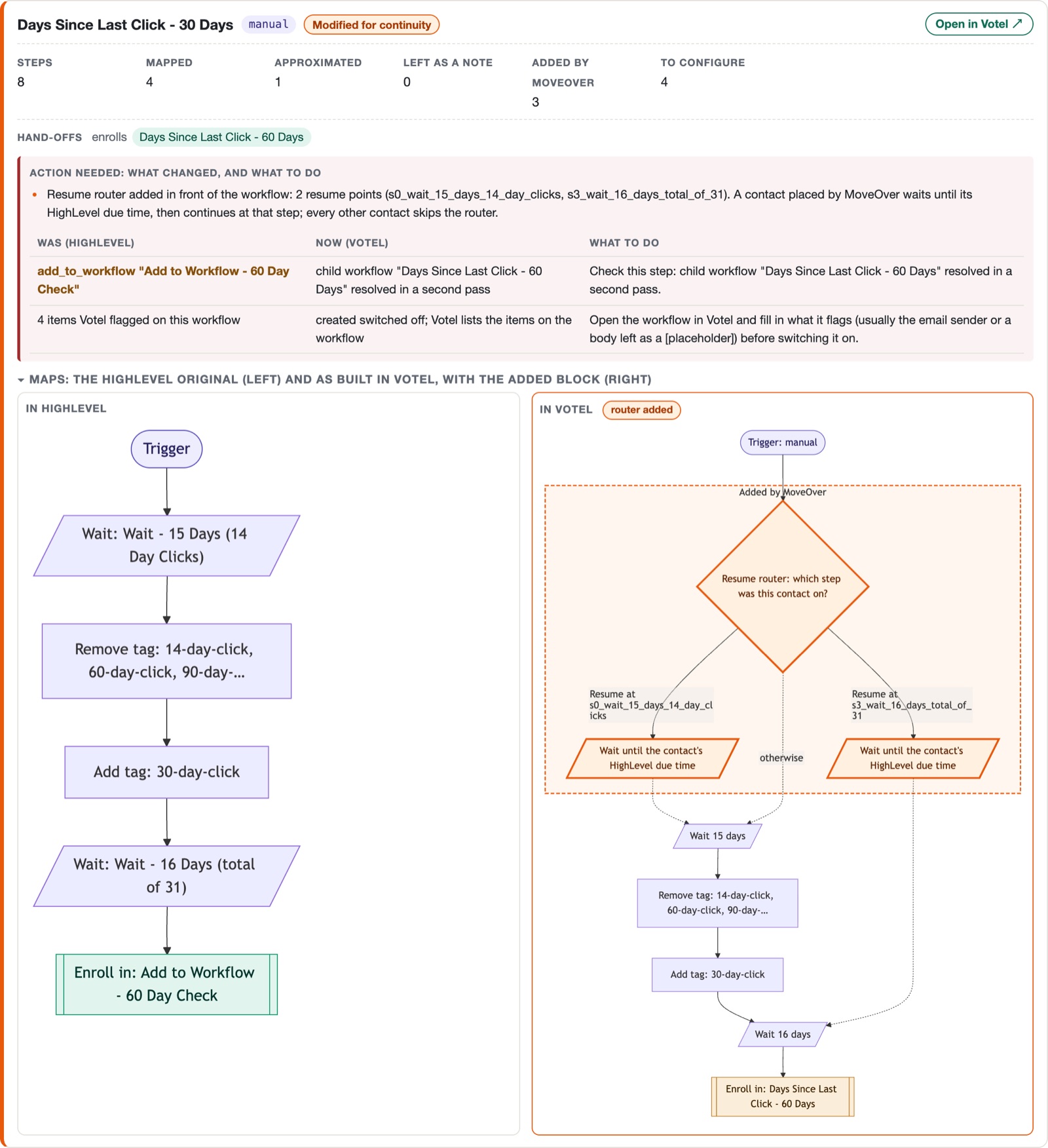
One illustrative workflow, "New lead nurture", drawn the way the report draws it. Left is HighLevel. Right is what MoveOver built in Votel.
Contacts already in the sequence rejoin at their step and their date. Everyone else skips this block.
Every workflow is drawn twice: the way it was in HighLevel and the way MoveOver built it in Votel. The 21 that were changed to keep your contacts mid-sequence show both, with the added block highlighted. The rest show one diagram, because nothing changed. On a real account: 127 workflows, 1,625 steps, drawn in 0.3 seconds.
MoveOver reads each contact's notes and tasks, which a plain export never touches, and writes them onto the Votel contact with the date, the author and the due date. Deals land on their pipeline stage. Upcoming appointments are booked on the matching calendar. A contact that already exists in Votel keeps its Votel tags and notes; nothing is overwritten.
The original date and author stay in the title of every note.
You can try it small, stop it, undo it, and read what actually landed.
After the run, MoveOver reads Votel and checks every tag, field, template, form, pipeline and workflow it created, and a random sample of contacts by id.
The report names the Votel account it wrote to, so you know it went to the right place.
Send only the 500 most recent contacts, look at the result in Votel, then run it for everyone. Contacts merge, nothing duplicates.
One button. What is already in Votel stays, the rest goes into your archive, and you still get the report.
Type UNDO and MoveOver removes exactly what that run created, in the right order, and nothing that was in Votel before. Verified on a real run: 211 workflows, 15 agents and 500 contacts removed, zero failures.
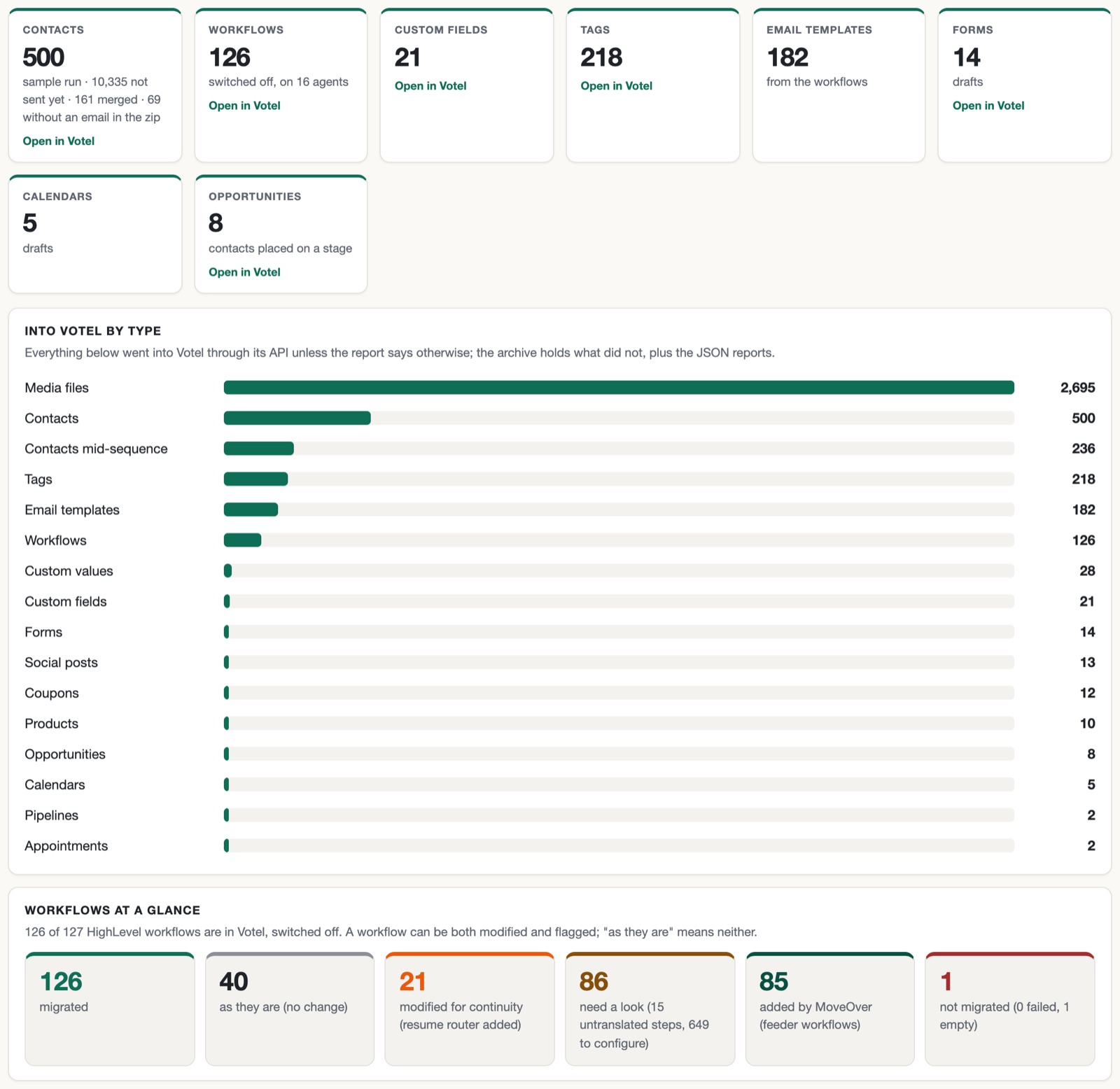
Every run ends with a report you can open from your MoveOver library on this site: what went into Votel, what needs your attention with the exact change spelled out, what stayed in the archive and why, and the next steps in order. Every workflow card opens that workflow in Votel. This is a real one.
Your own report is private to your MoveOver key. The example below comes from a real migration of 127 workflows, with personal data replaced.
Opens in a new tab. Overview, 126 workflow cards, action items, verification, archive.
Already run a migration? Open your library with the same key you activated the extension with.
MoveOver is free for our Votel affiliates. Choose the Votel plan that fits your agency, then request your license key to activate the Chrome extension.
Use the All Things Votel link for your Votel signup so your account can be matched to us and qualify for included MoveOver access.
Use the same email you used for Votel. Once the referral is confirmed, we send the key that activates your extension and the migrations included with your plan.
Add MoveOver from the Chrome Web Store, then open it in your browser and paste your key once.
Open in Chrome Web StoreReview the report, switch each workflow on when it is ready, then press Place contacts: everyone resumes where they were.
MoveOver is only available to agencies on a paid Votel plan bought through our link, and it costs nothing extra. Pick the plan that matches how many client accounts you are moving.
For an agency moving a handful of client accounts off HighLevel.
For an agency moving its whole client book, with no cap and no time limit.
You create your account with Votel, which handles billing and official product support. I may earn a commission, and All Things Votel adds no extra subscription fee. Available after your paid Votel plan is verified. Free plans, trials, and Votel accounts opened through another link do not qualify. Signed up through our link already? Use Claim existing access.
For your agency’s own client accounts only. Not for resale, sublicensing, or use as a migration service for other agencies.
Sign up through our link and request your affiliate activation. MoveOver is free for our Votel affiliates, with the migration allowance included in your Votel plan.
Affiliate link. I may earn a commission at no extra cost to you. Free plans and trials do not qualify for included migrations.