What does the Decision node do in Votel?
The Decision node branches a workflow on hard data: contact fields, workflow variables or contact properties. You set conditions with operators such as Equals, Contains or Is Empty, combine them with AND or OR, and the node follows the first path that matches. No AI is involved. Always add a default path as a catch-all.
When should I use the Decision node?
Use it when the answer is factual: a field is blank, a booking exists, or a lead is in a certain stage.
Working example
Working example: one field, two paths. Tested in the Votel workflow simulator on October 19, 2026 with a synthetic contact, Jamie Sandbox. A path set to First name Equals "jamie", all lowercase, matched the contact saved as "Jamie", so in this run Equals ignored letter case. Changing the value to "jordan" sent the same contact down No Match. This node only reads data, so no live channel was involved.
Manual trigger → Decision (First name equals jamie) → Matched the path, or No Match → End
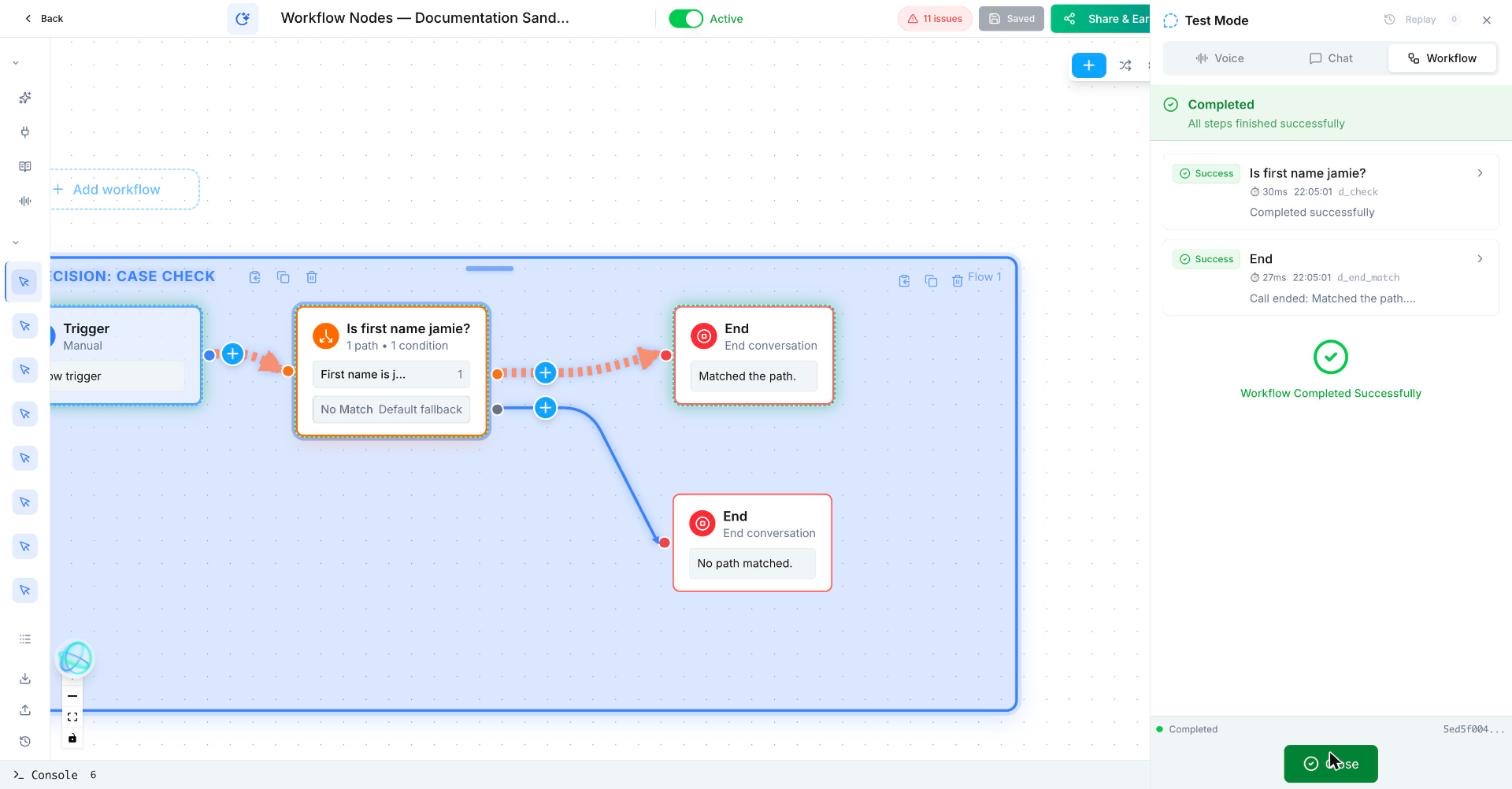
Trigger: Manual
Decision: Is first name jamie?
  Path 1 "First name is jamie": First Name · Equals · jamie
  No Match: default fallback
Path 1 → End: "Matched the path."
No Match → End: "No path matched."
Test: Workflow mode with a synthetic contact named Jamie
What does a Decision branch look like in practice?
After a booking attempt, a dental practice checks whether an appointment was actually created. Successful bookings get a confirmation; unsuccessful ones create a staff task.
How do I use the Decision node in Votel?
- Choose the single fact to test.
- Write labels that describe the outcome, such as “Booking created.”
- Add a deliberate path for everything that does not match.
- Test each branch with dummy data before adding live actions.
Step by step, from Votel's docs
- Pick the contact field or workflow variable to check.
- Choose an operator: Equals / Not Equals, Contains / Does Not Contain, Starts With / Ends With, or Is Empty / Is Not Empty.
- Combine conditions with AND (all must be true) or OR (any one is enough). You can mix the two.
- Add one path per outcome, each with its own conditions. The node checks them in order and takes the first match, so put the most specific path first.
- Add a default path with no conditions, so every contact has somewhere to go.
How does the Decision node choose a path?
Votel's docs give this example of paths evaluated in order:
| Path | Conditions | Result |
|---|---|---|
| Path A | Contact has email AND phone number | Full follow-up sequence |
| Path B | Contact has phone number only | SMS-only follow-up |
| Path C | Default (no conditions) | Email collection flow |
A contact with both an email and a phone number matches Path A and stops there, even though they would also satisfy Path B. That is why order matters.
What should come after a Decision?
After this block, use the matching action, usually an SMS, Email, task, or handoff.
When should I use Classifier instead of Decision?
Use Classifier when the workflow must interpret what a person means rather than compare a known value.
Classifier uses AI to read the conversation. Decision compares known values. The docs put it simply: use Decision for data-driven routing and Classifier for AI-driven routing. "Does the contact have an email?" is a Decision. "Is the caller frustrated?" is a Classifier.
Why is my Decision node taking the wrong path?
- Path order. The first match wins. A broad path above a narrow one will swallow it.
- The variable is empty when the node runs. If the Decision sits before the step that collects the data, Is Empty will always be true. Move it after collection.
- Equals on free text. A reply of "yes please" does not equal "yes". Use Contains, or collect the value with a Yes / No field in Ask and Save first.
- Case and spacing. docs.votel.ai does not say whether comparisons are case-sensitive. In our sandbox run on October 19, 2026, Equals matched "jamie" against a contact saved as "Jamie", so letter case was ignored for that text field. We did not test extra spaces, and the docs do not promise this behaviour, so test your own values before you rely on it.
- Contacts get stuck. A missing default path leaves unmatched contacts with nowhere to go. Add one.
Frequently asked questions about Decision
Does the Votel Decision node use AI?
No. Votel's docs describe it as straightforward if/then logic that evaluates hard data with rules you define.
What operators does the Decision node support?
Equals and Not Equals, Contains and Does Not Contain, Starts With and Ends With, and Is Empty and Is Not Empty. Conditions can be combined with AND or OR.
What happens if more than one path matches?
The node evaluates paths in order and follows the first match, so the order of your paths decides the result.
Do I need a default path?
Votel's docs say to always include one. A default path with no conditions catches every contact that matches nothing else.
Is the Votel Decision node case-sensitive?
Not in our test. In a sandbox run on October 19, 2026, a path set to First name Equals "jamie" matched a contact saved as "Jamie". docs.votel.ai does not document case handling, so test the exact values your workflow uses.
Sources: Decision Node, Classifier Node on docs.votel.ai, checked October 19, 2026. Where the docs are silent, this page says so instead of guessing.
Before you publish or activate: verify the current builder labels in Votel and test with dummy data. This independent guide describes the purpose and a safe setup approach; it does not replace Votel’s current product documentation or compliance advice.
Related blocks
- Classifier: Uses an LLM to read natural language and select one predefined outcome, such as booking, emergency, team, or opt-out.
- Wait For Time & Follow Up Later: Pauses work until a defined time or schedules the next touch without making the workflow busy-wait.
- Update Contact & Set Pipeline: Keeps the contact record and sales process in sync with what the workflow learned or completed.