What does the Classifier node do in Votel?
The Classifier node reads the conversation so far, applies instructions you write, and sends the workflow down one of the branches you defined, such as Sales, Support or Billing. It never speaks to the caller. Use it for intent, sentiment or urgency when people describe the same need in many different ways.
When should I use the Classifier node?
Use it when people can express the same need in many different ways, but your workflow needs one clear next path.
Working example
Working example: service-intent routing. Tested in the Votel workflow simulator with synthetic JSON input on September 17, 2026. The safe sandbox flow exposed two explicit classes, Booking and Team, and completed successfully without an external action.
Manual trigger → LLM Classifier → Booking or Team → End
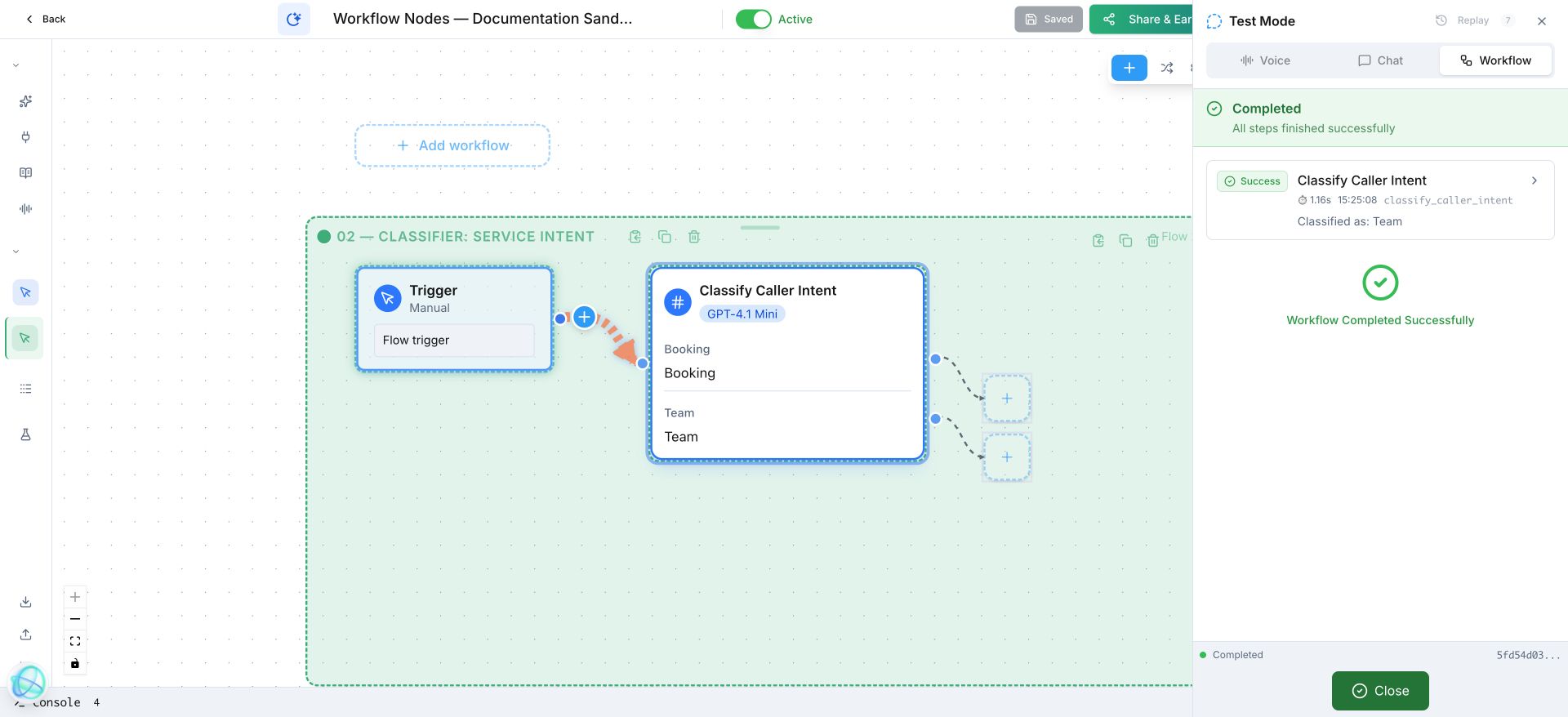
The LLM reads the caller’s wording and selects one outcome you already defined: Booking when they want to schedule a service visit, or Team when they want to speak with a person.
What does a Classifier route look like in practice?
A home-services agent classifies messages as new quote, existing customer, emergency, or other, then sends each to the right flow.
How do I set up the Classifier node in Votel?
- Define a small set of outcomes based on what should happen next.
- Give each outcome realistic examples and near-misses.
- Connect every outcome to a safe next action.
- Include an “other” route so unfamiliar wording does not disappear.
Step by step, from Votel's docs
- Write classification instructions that say what to evaluate and how to choose. The docs contrast a good instruction, which tells the AI to judge emotional tone from word choice and expressed frustration across the whole conversation, with "Figure out how they feel," which is too vague.
- Add one branch per outcome. Each branch is a possible result.
- Connect every branch to the next node in its path, so each classification leads somewhere real.
- Place the Classifier after the caller has said enough to judge. It reads the conversation so far, so an early Classifier has little to work with.
- Run a test. Our September 17 sandbox run used synthetic JSON input with two branches, Booking and Team, and finished without touching a live channel.
What can the Votel Classifier detect?
| Pattern | Example branches from Votel's docs |
|---|---|
| Sentiment | Positive, Negative, Neutral |
| Intent | Sales inquiry, Support request, Billing question, General information |
| Urgency | High (needs immediate attention), Medium (can wait a few hours), Low (no time pressure) |
These are patterns, not a fixed menu. You define the branches and the instructions, so any dimension you can describe in plain words can become a classification.
What should come after a Classifier?
After this block, use a Conversation Node, Decision, human handoff, or the next specialist workflow.
When should I use Decision instead of Classifier?
Use a Decision when the workflow can check a known contact field without AI interpretation.
| Decision node | Classifier node | |
|---|---|---|
| Evaluates | Field values and variables | Conversation context |
| Method | Rule-based conditions, no AI | AI analysis |
| Use when | You have concrete data to check | You need to read tone, intent or meaning |
| Example | "Does the contact have an email?" | "Is the caller frustrated?" |
Comparison adapted from Votel's Decision node documentation. If the answer already sits in a field, Decision is cheaper to reason about and easier to test.
Why is my Classifier picking the wrong branch?
- The instructions are vague. Votel's docs say precision drives accuracy. Name what to look for and how to break a tie between two branches.
- Two branches overlap. "Billing" and "Payments" will fight. Merge them, or say in the instructions where one ends and the other begins.
- There is no catch-all. docs.votel.ai does not describe a built-in fallback branch for the Classifier, so add your own Other branch and send it to a person or a clarifying question.
- It runs too early. If the caller has only said hello, there is nothing to classify. Move it after a Conversation Node.
- You only tested clean phrases. Try near misses and mixed requests, like "I want a quote but my last bill was wrong."
Frequently asked questions about Classifier
Does the Classifier node talk to the caller?
No. Votel's docs say it silently evaluates the conversation and routes to the matching branch without asking the caller anything.
When should I use Classifier instead of Decision?
Use Classifier when the workflow has to interpret tone, intent or meaning. Use Decision when it can check a concrete field value or variable with a rule.
What is the difference between a Classifier and Conversation Node routes?
Conversation Node routes branch on what the caller says in direct reply to the agent's question. The Classifier evaluates the whole conversation against your instructions without asking anything.
How many branches should a Classifier have?
Votel's docs do not state a limit. Keep to outcomes you can act on. The examples in the docs use three or four branches per classifier.
Sources: Classifier Node, Decision Node, Conversation Node on docs.votel.ai, checked October 19, 2026. Where the docs are silent, this page says so instead of guessing.
Before you publish or activate: verify the current builder labels in Votel and test with dummy data. This independent guide describes the purpose and a safe setup approach; it does not replace Votel’s current product documentation or compliance advice.
Related blocks
- Conversation Node: Lets your agent reply, ask the next useful question, and route people by what they mean.
- Decision: Checks a clear rule and sends the workflow down the matching path.
- Sub Agent: Gives a specialized AI agent a narrow job inside a larger workflow.