What does the Sub Agent node do in Votel?
The Sub Agent node runs a separate AI agent in the background of your workflow. It can use MCP tools and web search, then return structured output that later nodes use. The caller never talks to it. That is the difference from Forward to Agent, which hands the live call to another AI agent.
When should I use a Sub Agent?
Use it when one focused task (research, qualification, summarization, or structured analysis) would make the main workflow clearer.
Working example
Working example: a callback note written in the background. Tested in the Votel workflow simulator on October 19, 2026 with a synthetic contact. A Sub Agent on GPT-4.1 Mini returned two structured outputs, note and urgency, in 1.4 seconds. The Add Note step after it did not start until the Sub Agent finished, then filled both values into the note it saved. This run used a Manual trigger, so there was no live caller, and the Sub Agent had no tools or web search.
Manual trigger → Sub Agent (note, urgency) → Add Note → End
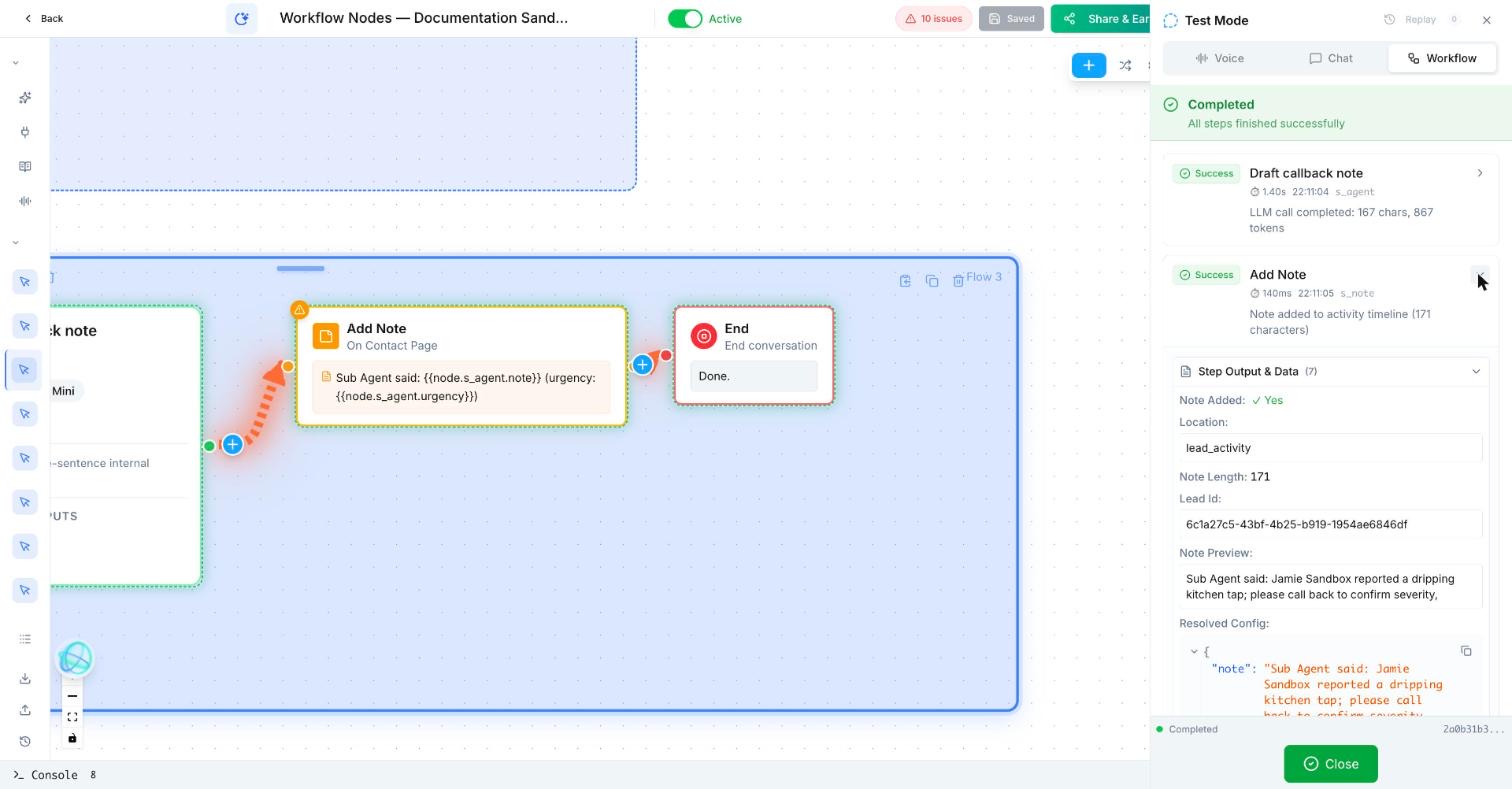
Trigger: Manual
Sub Agent: Draft callback note (OpenAI, GPT-4.1 Mini)
  System message: You write one-sentence internal callback notes for Maple Street Plumbing, a fictional business. The contact is {{contact.first_name}} {{contact.last_name}}. They reported a dripping kitchen tap. Return the note and an urgency of low, medium or high.
  Structured outputs: note, urgency
Add Note (contact page): Sub Agent said: {{node.s_agent.note}} (urgency: {{node.s_agent.urgency}})
End
s_agent is the step ID in our sandbox. Use the ID shown on your own Sub Agent step.What does a Sub Agent look like in practice?
A B2B intake flow asks a research sub-agent to turn a company name and website into a short sales brief before the account executive calls.
How do I set up a Sub Agent in Votel?
- Give the sub-agent one narrow responsibility.
- Provide only the tools and data it needs.
- Define the exact structured output the main workflow expects.
- Test its input and output before connecting it to live customer actions.
Step by step, from Votel's docs
- Write clear, specific instructions for one focused task.
- Give it the tools the task needs: MCP tools for external services, web search for real-time information.
- Define the structured output, the exact shape later nodes expect.
- If you need several kinds of processing, use several Sub Agent nodes instead of one that does everything. The docs recommend this.
- Test the output against the nodes that consume it before going live.
What can a Votel Sub Agent use?
| Capability | What it is for |
|---|---|
| MCP tools | Connect to external services and APIs, such as CRMs or ERPs, through the Model Context Protocol. |
| Web search | Look up real-time information, such as researching a company before a sales call. |
| Structured output | Return data in a defined format other nodes can read. |
The docs say the Sub Agent works in the background "while the workflow continues or waits for results." In our sandbox run on October 19, 2026, the next step waited: Add Note started only after the Sub Agent returned, 1.4 seconds later, and used its outputs. That run had no live caller, so time a Sub Agent inside a real call before you place one mid-conversation.
What should come after a Sub Agent?
After this block, use a human review, Update Contact, Create Task, or a specialist workflow.
When should I use Forward to Agent instead of a Sub Agent?
Avoid it when a simple Decision, field update, or one direct question will do.
| Sub Agent | Forward to Agent | |
|---|---|---|
| Interaction | Background processing, no caller interaction | Transfers the live call to another agent |
| Purpose | Data processing, research, complex reasoning | Handing the conversation to a specialized agent |
| Caller awareness | The caller does not know it is running | The caller speaks directly with the new agent |
| Output | Returns structured data to the workflow | Takes over the conversation |
Comparison from Votel's Sub Agent documentation.
Why is my Sub Agent output not working in later nodes?
- The output shape does not match. If a Decision expects a field called
eligibleand the Sub Agent returnsis_eligible, the check fails. Define the output once and copy names exactly. - The task is too broad. "Research and qualify and summarize" gives muddy results. Split it into separate Sub Agents.
- A tool is missing. The Sub Agent can only use MCP tools you have connected. Check the integration first.
- Web results are out of date or wrong. Treat research output as a draft for a person, not a fact to read to a customer.
Frequently asked questions about Sub Agent
Does the caller talk to the Sub Agent?
No. Votel's docs say the caller does not interact with the Sub Agent directly. It runs behind the scenes and returns results to the workflow.
What tools can a Votel Sub Agent use?
MCP tools for external services and APIs, web search for real-time information, and structured output for returning data in a defined format.
What is the difference between Sub Agent and Forward to Agent?
A Sub Agent processes data in the background and returns structured results. Forward to Agent transfers the live call to another AI agent, who then speaks with the caller.
Should one Sub Agent do several jobs?
Votel's docs recommend keeping Sub Agent tasks focused and using multiple Sub Agent nodes when you need different kinds of processing.
Does the workflow wait for a Votel Sub Agent to finish?
In our test, yes. In a sandbox run on October 19, 2026, the step after the Sub Agent started only once it returned its structured output, about 1.4 seconds later. That run had no live caller, so check the timing on a real call before you rely on it mid-conversation.
Sources: Sub Agent Node, Forward to Agent Node on docs.votel.ai, checked October 19, 2026. Where the docs are silent, this page says so instead of guessing.
Before you publish or activate: verify the current builder labels in Votel and test with dummy data. This independent guide describes the purpose and a safe setup approach; it does not replace Votel’s current product documentation or compliance advice.
Related blocks
- Conversation Node: Lets your agent reply, ask the next useful question, and route people by what they mean.
- Classifier: Uses an LLM to read natural language and select one predefined outcome, such as booking, emergency, team, or opt-out.
- API Lookup & Manual Tool Call: Gets information from an external service or asks an already-connected tool to perform a precise action.