What do the API Lookup and Manual Tool Call nodes do in Votel?
API Lookup sends a GET or POST request to an external API at a fixed point in your workflow, then maps fields from the JSON response into workflow variables. Manual Tool Call runs a tool from your MCP configuration, such as Zapier, Make or HubSpot, at a step you choose. Both run silently. The caller never hears them.
When should I use API Lookup or Manual Tool Call?
Use it only when a native Votel block or ready-made connector cannot do the job.
Working example
Working example: one lookup, a Success path and an Error path. Tested in the Votel workflow simulator on October 19, 2026 with a synthetic contact. The builder shows two outputs on API Lookup, Success and Error. A GET to a public test endpoint returned 200, took Success, and the response mapping args.first_name → echoed_name filled the variable with Jamie. Pointing the same node at an endpoint that always returns HTTP 500 routed the run to Error. No credentials were used. Manual Tool Call was not tested, because the sandbox has no MCP tools connected.
Manual trigger → API Lookup → Success → End, or Error → End
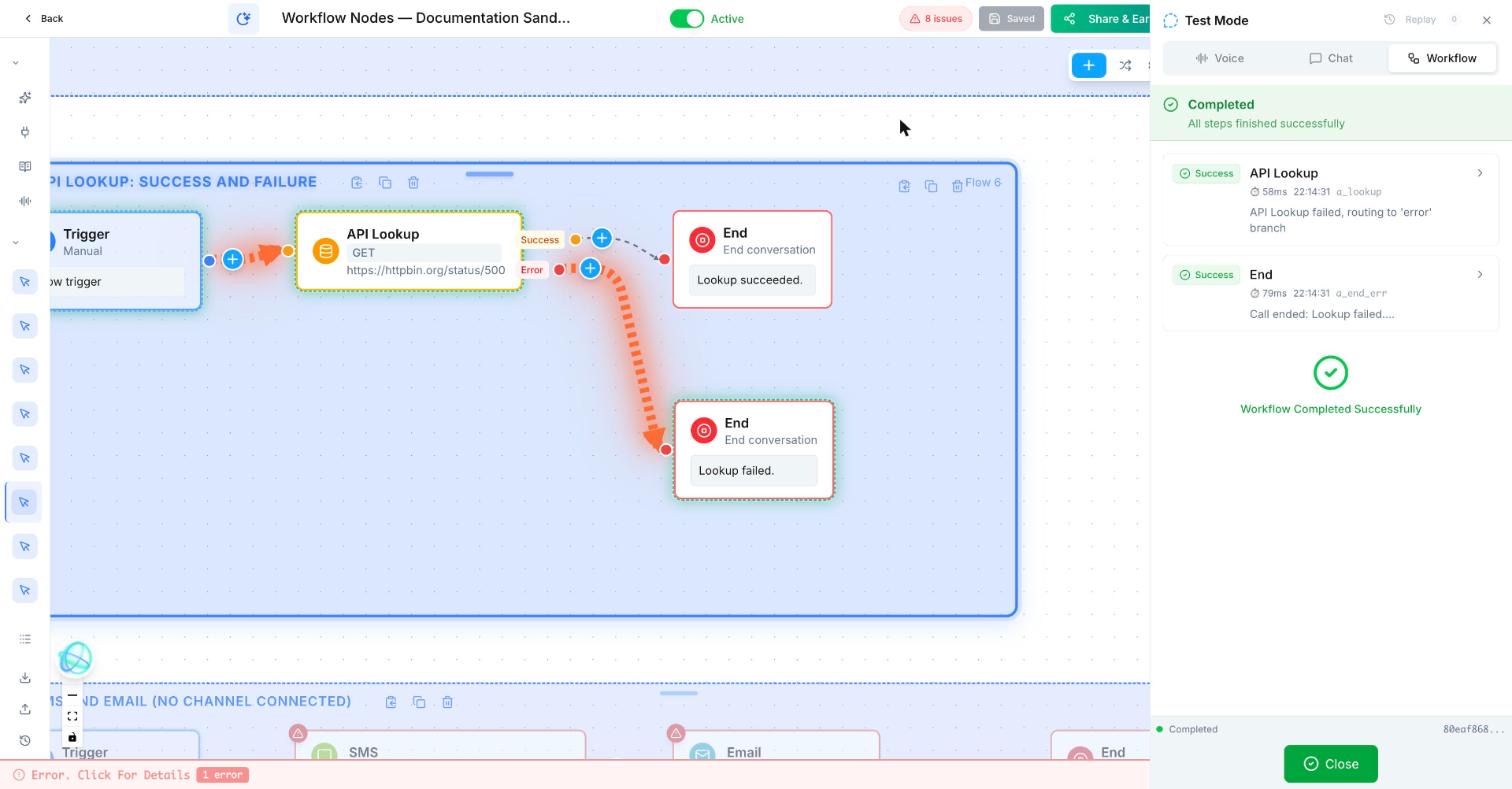
Trigger: Manual
API Lookup
  Method: GET
  URL: https://httpbin.org/anything?first_name={{contact.first_name}}
  Response mapping: args.first_name → echoed_name
  Retries: 0
  Success → End: "Lookup succeeded."
  Error → End: "Lookup failed."
Failure test: change the URL to https://httpbin.org/status/500What does an API lookup look like in a real workflow?
A delivery agent looks up an order status from the company’s service, then explains the result to the customer.
How do I set up the API Lookup node in Votel?
- Start with the smallest read-only test request possible.
- Use a connector first if it already supports the action.
- Store credentials outside screenshots and never paste them into tutorial copy.
- Validate the returned data before using it in a customer-facing message.
Step by step, from Votel's docs
- Add the API Lookup node where the data is needed and pick the method: GET to read data, POST to send it. These are the two methods the docs list.
- Enter the full endpoint URL. Variables go in with double curly braces, for example
https://api.example.com/customers/{{customer_id}}. - Add the headers your API expects, such as
Authorization: Bearer {{api_key}}andContent-Type: application/json. - For a POST, write the JSON body and fill it with variables like
{{caller_name}}and{{caller_email}}. - Map the response. Use dot notation to pick each field you need, so
order.statusbecomes a variable calledorder_status. - Press Test. It fires the real request so you can check the endpoint is reachable, the response looks the way you expected, and your mappings land.
For Manual Tool Call, the setup is shorter: pick the tool, pass in the variables it needs (a name, qualification answers, a summary), and map anything it returns to workflow variables.
What settings do API Lookup and Manual Tool Call have?
| Node | Setting | What it does |
|---|---|---|
| API Lookup | Method | GET retrieves data, such as a customer record. POST sends data, such as a new record. |
| API Lookup | URL | The full endpoint. Workflow variables are allowed inside it. |
| API Lookup | Headers | Authentication and content type, with variables if needed. |
| API Lookup | Request body | POST only. A JSON body that can include workflow variables. |
| API Lookup | Response mapping | A dot-notation path and the variable name it fills, for example order.tracking.number to tracking_number. |
| API Lookup | Test | Fires the call before you activate so you can inspect the real response. |
| Manual Tool Call | Tool | Any tool in your MCP configuration. The docs name Zapier, Make, HubSpot, Salesforce, Shopify and custom APIs exposed through MCP. |
| Manual Tool Call | Data in and out | Send workflow variables to the tool, and store what it returns in workflow variables for later nodes. |
What should come after an API lookup?
Votel's docs point to a Decision node next, so the workflow can branch on what came back. After that, a Conversation Node can read the result to the caller, or Update Contact can save it to the record.
When should I use Manual Tool Call instead of API Lookup?
Avoid it when a built-in block can do the same job more simply.
Pick by what you are calling. API Lookup is a raw HTTP request, so you own the URL, headers, body and response mapping. Manual Tool Call runs a tool that is already connected through MCP, so the connection lives in that integration instead of in the node.
Both fire at a fixed point you choose. That is what separates them from tools you give the agent in its system prompt, where the AI decides when to call them. Votel's docs recommend Manual Tool Call when you need precise control over when an integration fires.
Why is my Votel API Lookup not returning data?
- A variable in the URL is blank.
{{customer_id}}only works if an earlier node saved it. Run a test and check the value exists before the lookup runs. - The mapping path does not match the response. If status sits inside
order, the path isorder.status, notstatus. Use Test to see the actual JSON before you guess. - Authentication fails. Check the exact header format your API expects. Keep real keys out of screenshots, tutorials and shared docs.
- A POST body is rejected. Confirm the content type header is set and that the body is still valid JSON once the variables are filled in. A name with a quote mark in it is a good test.
- The endpoint errors or times out. docs.votel.ai does not describe a failure output, but the builder shows one. In our sandbox run on October 19, 2026, an HTTP 500 sent the run down API Lookup's Error output. Connect Error to a safe fallback, such as a message that a person will follow up. A call can also succeed with a field missing, so a Decision that checks the mapped variable Is Empty still helps on the Success path.
Frequently asked questions about API Lookup & Manual Tool Call
Which HTTP methods does the Votel API Lookup node support?
Votel's documentation lists two: GET for retrieving data and POST for sending it. We found no mention of PUT, PATCH or DELETE, so check the builder before you plan around them.
How do I use API response data later in the workflow?
Map each field you need with dot notation, such as order.tracking.number, to a variable name like tracking_number. Any later node can then use that variable in double curly braces.
Does the caller hear anything while Manual Tool Call runs?
No. Votel's docs say the node runs silently and instantly, and the caller experiences no pause or interruption.
What is the difference between Manual Tool Call and letting the AI use tools?
Manual Tool Call fires at a fixed point you choose in the workflow. Tools given to the agent through its system prompt are called whenever the AI decides they are needed.
What happens when a Votel API Lookup call fails?
In our sandbox run on October 19, 2026, the builder showed separate Success and Error outputs, and a request that returned HTTP 500 followed Error. docs.votel.ai does not describe this, so connect Error to a fallback and test it before you go live.
Sources: API Lookup Node, Manual Tool Call Node on docs.votel.ai, checked October 19, 2026. Where the docs are silent, this page says so instead of guessing.
Before you publish or activate: verify the current builder labels in Votel and test with dummy data. This independent guide describes the purpose and a safe setup approach; it does not replace Votel’s current product documentation or compliance advice.
Related blocks
- Decision: Checks a clear rule and sends the workflow down the matching path.
- Update Contact & Set Pipeline: Keeps the contact record and sales process in sync with what the workflow learned or completed.
- Sub Agent: Gives a specialized AI agent a narrow job inside a larger workflow.