What do the Update Contact and Set Pipeline nodes do in Votel?
Update Contact writes values to standard or custom fields on the contact's record, using static text or workflow variables, and can set several fields in one node. Set Pipeline places the contact in a chosen pipeline stage, moving them if they are already in that pipeline and adding them if they are not.
When should I update the contact or the pipeline?
Use it so staff can see the current context without rereading every conversation.
Working example
Working example: three CRM writes in one pass. Tested in the Votel workflow simulator on October 19, 2026 with a synthetic contact. Update Contact set City to Springfield, Tag added sandbox-qualified, and Set Pipeline placed the contact in Sales at the Qualified stage. Each step logged its change, and the contact record showed the new tag and pipeline stage afterwards. These are CRM writes only: no message, call or external app was involved.
Manual trigger → Update Contact (City) → Tag → Set Pipeline (Sales → Qualified) → End
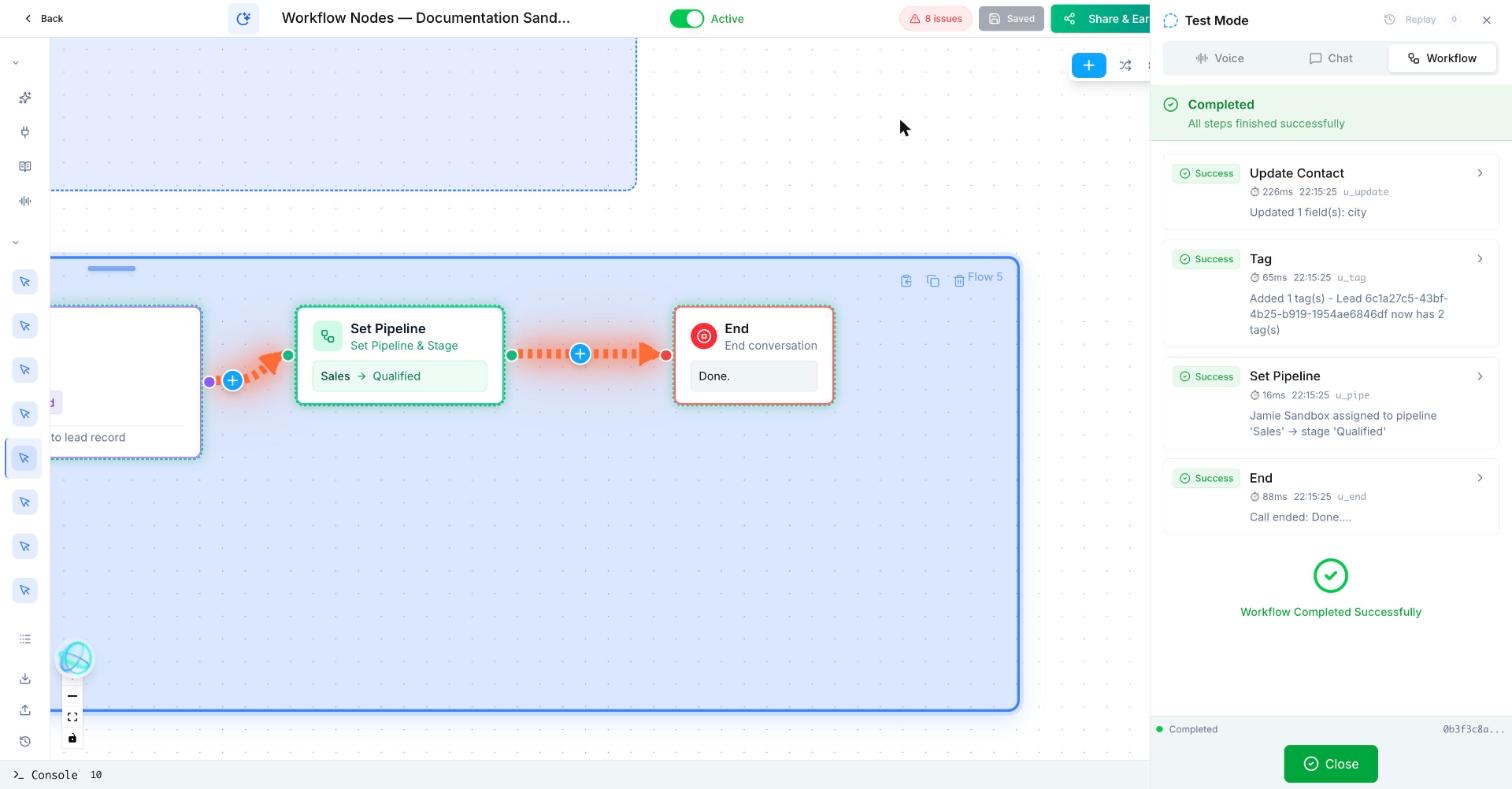
Trigger: Manual
Update Contact: City → Springfield (static value)
Tag: sandbox-qualified
Set Pipeline: Sales → Qualified
End
Use a test contact. Moving a real contact can start other workflows that use the Pipeline Column Change trigger.
What does a CRM update look like after a call?
After a demo is booked, the workflow saves company size, adds a note, and moves the opportunity to “Demo booked.”
How do I set up Update Contact and Set Pipeline in Votel?
- Save only information that will be useful later.
- Update a pipeline stage only for a meaningful process change.
- Use tags sparingly for short labels, not as a second pipeline.
- Confirm the target contact and pipeline before testing.
Update Contact, from Votel's docs
- Place it after the data collection steps, so the variables it uses already have values.
- Pick the fields to write. Standard fields (name, email, phone) and your custom fields are both available.
- Set each value as static text, such as "Qualified", or a variable, such as
{{preferred_language}}. - If different branches need different values, chain a separate Update Contact on each branch.
Set Pipeline, from Votel's docs
- Create the pipelines and stages before building the workflow.
- Select the pipeline, for example Sales Pipeline.
- Select the stage, for example Qualified, Proposal Sent or Won.
What settings do Update Contact and Set Pipeline have?
| Node | Setting | What it does |
|---|---|---|
| Update Contact | Fields | Any standard or custom field. Several fields can be set in one node. |
| Update Contact | Value | Static text or a workflow variable collected earlier. |
| Set Pipeline | Pipeline | One of your existing pipelines. |
| Set Pipeline | Stage | The column the contact lands in. Already in the pipeline means a move. Not in it means they are added. |
Common uses in the docs: status updates such as Contacted or Interested, storing budget range or timeline from the call, updating a lead score, and moving contacts to Appointment Set, Needs Follow-Up, Won or Lost.
What should come after a CRM update?
After this block, use Add Note, Create Task, confirmation messaging, or a handoff.
When should I use a tag instead of a pipeline stage?
Avoid moving stages for a weak signal such as an unopened email.
Votel's docs make the case for pipelines when you need structure: contacts sit on a Kanban board, progress through defined stages, feed stage-by-stage reporting, and can be dragged between stages by your team. Tags, set with the Tag Lead node, are for quick flags. The docs suggest using both when you need structured stages and simple labels.
Why didn't my Votel contact field update?
- The variable was empty. Update Contact ran before the step that collected the value. Move it later.
- The custom field does not exist yet. Create it, then select it in the node.
- The pipeline or stage is missing. The docs say to create pipelines and stages before building workflows that reference them.
- Only one branch updates. Each branch needs its own Update Contact node if it should set values.
- A stage change set off other automations. Other workflows can use the Pipeline Column Change trigger. Check for them before moving test contacts.
Frequently asked questions about Update Contact & Set Pipeline
Can Update Contact set more than one field at once?
Yes. Votel's docs say you can update multiple fields in a single Update Contact node, using static text or workflow variables.
What happens if the contact is already in the pipeline?
Set Pipeline moves them to the new stage. If they are not in that pipeline yet, they are added at the stage you chose.
Can a pipeline stage change start another workflow?
Yes. Votel's docs suggest using the Pipeline Column Change trigger on other workflows to act when contacts move between stages.
Should I use tags or pipeline stages?
Use pipeline stages for progress you want to track and report on. Use tags, through the Tag Lead node, for quick flags. The docs suggest combining them when you need both.
Sources: Update Contact Node, Set Pipeline Node, Tag Lead Node on docs.votel.ai, checked October 19, 2026. Where the docs are silent, this page says so instead of guessing.
Before you publish or activate: verify the current builder labels in Votel and test with dummy data. This independent guide describes the purpose and a safe setup approach; it does not replace Votel’s current product documentation or compliance advice.
Related blocks
- Decision: Checks a clear rule and sends the workflow down the matching path.
- Extract Dynamic Variables: Pulls several useful details from a natural conversation and saves them as structured fields.
- DND Contact: Stops future outreach on the selected channels for a contact who opts out.