What does the Extract Dynamic Variables node do in Votel?
Extract Dynamic Variables reads the full conversation transcript and pulls out the values you define, such as order items, pickup time or sentiment, then saves each one as a variable. It suits natural conversations where people share details out of order or change their minds, which a single Ask and Save question cannot handle.
When should I use Extract Dynamic Variables?
Use it when information arrives out of order, is corrected, or is spread across messages.
Working example
Working example: one reply, three variables. Tested in the Votel chat simulator on October 19, 2026 with synthetic replies. One open question was followed by Extract Dynamic Variables with three variables: issue (text), email (email type) and preferred_day (text). A reply giving the email as "jamie at example dot com" came back as jamie@example.com in 1.2 seconds. A second reply with a malformed address, jamie@@example, left the email variable blank while issue and day still filled, with no re-ask and no error. This ran in the chat simulator only, so nothing was sent anywhere.
Conversation Started → Static question → Extract Dynamic Variables → End (reads the values back)
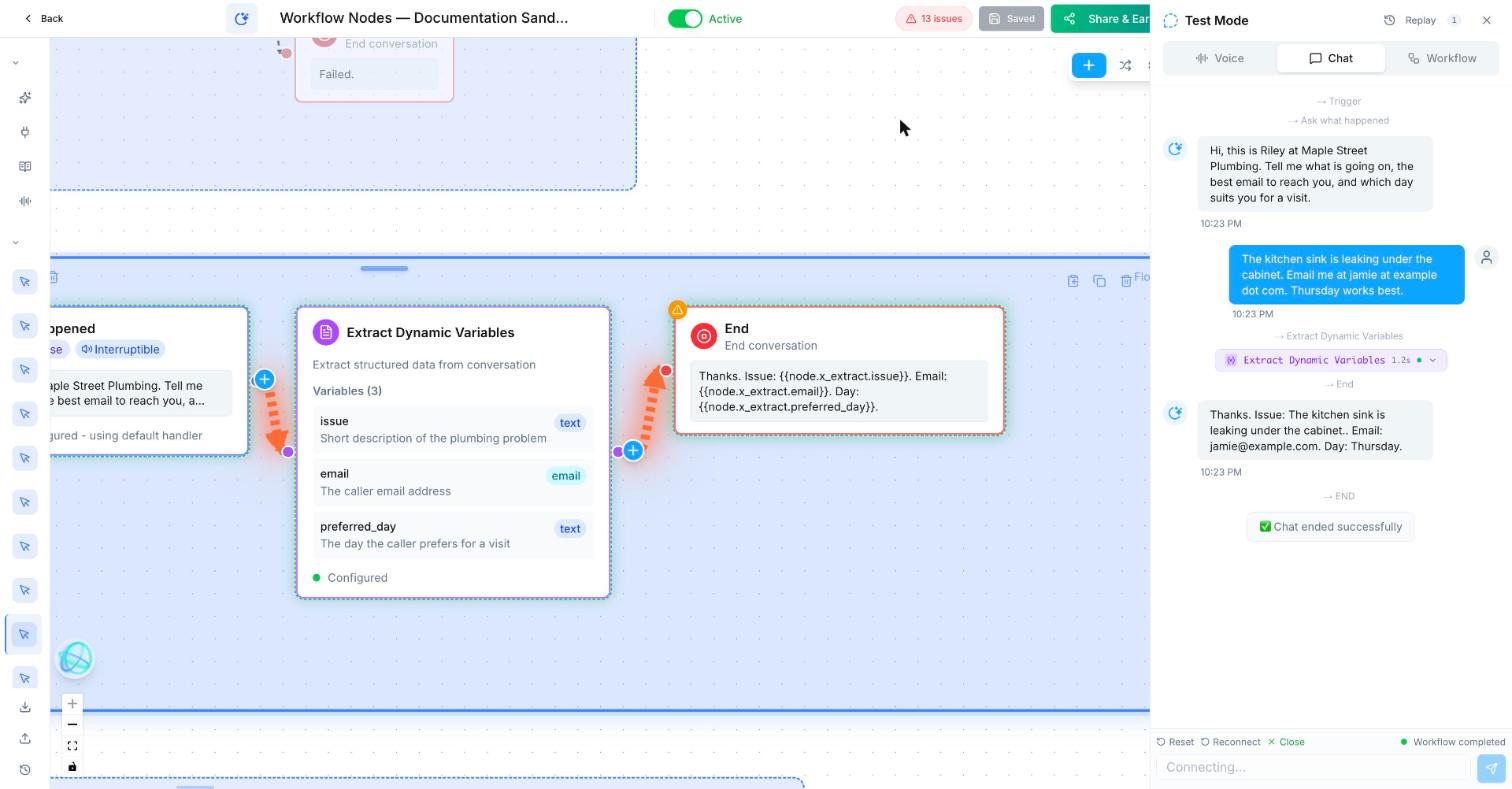
Trigger: Conversation Started
Talking step (static): Hi, this is Riley at Maple Street Plumbing. Tell me what is going on, the best email to reach you, and which day suits you for a visit.
Extract Dynamic Variables
  issue (text): Short description of the plumbing problem
  email (email): The caller email address
  preferred_day (text): The day the caller prefers for a visit
End: Thanks. Issue: {{node.x_extract.issue}}. Email: {{node.x_extract.email}}. Day: {{node.x_extract.preferred_day}}.
x_extract is the step ID in our sandbox. Use the ID shown on your own step.What does variable extraction look like in practice?
A catering lead says the event date, guest count, venue, dietary needs, and budget over a few messages; the workflow extracts each item for the sales team.
How do I set up Extract Dynamic Variables in Votel?
- List the exact fields to extract and what a valid value looks like.
- Include a rule for corrections and missing information.
- Test with messy, realistic language, not only perfect answers.
- Check extracted values before making a booking, quote, or external API action.
Step by step, from Votel's docs
- Place the node after a Conversation Node where the caller has had room to talk. The docs say it works best there.
- Add each variable you want. Every one needs a variable name, such as
order_items, and a description that tells the AI what to look for, such as "all menu items the caller ordered, with quantities". - Write descriptions that settle the hard cases: what to do when the caller changes their mind, and what format you want back.
- Feed the results into an Update Contact node if they should be saved to the contact record.
What can Extract Dynamic Variables pull from a conversation?
Votel's docs walk through a takeout order where the caller mentions items at different points, changes their mind and adds extras. One node pulls out:
| Variable | Extracted value |
|---|---|
| Items ordered | "2 large pizzas, 1 Caesar salad, 3 sodas" |
| Special requests | "no onions on the pizza, extra dressing" |
| Pickup time | "6:30 PM" |
| Total items | "6" |
The other uses the docs list are sentiment or satisfaction, issue categorization from a free-form description, and meeting notes such as action items and key decisions.
What should come after Extract Dynamic Variables?
After this block, use a Decision, Update Contact, task, quote flow, or human review.
When should I use Ask and Save instead of Extract Dynamic Variables?
Use Ask & Save when a single direct question is clearer and more reliable.
Ask and Save asks one question and validates the reply against a type such as Email or Phone. Extract Dynamic Variables asks nothing. It reads what was already said. docs.votel.ai does not describe type validation for extracted values. In our sandbox run, an email-type variable cleaned up a spoken address but came back blank for a malformed one, with no re-ask. When a value must be a valid email or phone number, collect it with Ask and Save.
Why is Extract Dynamic Variables returning empty or wrong values?
- It ran before the detail came up. The node reads the transcript at the moment it runs. Move it later.
- The description is vague. "Order" is not enough. "Every menu item with its quantity, using the final version if the caller changed it" is.
- Formats vary from call to call. Say the format in the description, for example "pickup time as h:mm AM/PM".
- The value is not on the contact. Extracted values are workflow variables. Add Update Contact to save them to the record.
- A typed variable is blank. In our sandbox, an email-type variable stayed empty when the caller gave a malformed address, and the workflow carried on. Check it with a Decision set to Is Empty before you use the value.
- You only tested tidy conversations. Test with corrections, interruptions and a caller who never mentions one of the fields.
Frequently asked questions about Extract Dynamic Variables
What is the difference between Extract Dynamic Variables and Ask and Save?
Ask and Save collects one answer to one specific question. Extract Dynamic Variables reads the whole conversation and can pull several data points from it without asking anything.
Can Extract Dynamic Variables pull several values at once?
Yes. You define as many variables as you need, each with a name and a description, and the node extracts all of them from the transcript.
How do I save extracted values to the contact record?
Votel's docs suggest passing the extracted variables into an Update Contact node, which writes them to the contact's fields.
What kinds of information can it extract?
The docs list order details, sentiment, issue categories and meeting notes such as action items, decisions and key topics.
Does Extract Dynamic Variables check that an email is valid?
Partly, in our test. In a sandbox run on October 19, 2026, an email-type variable turned "jamie at example dot com" into jamie@example.com, but a malformed address came back blank with no re-ask and no error. docs.votel.ai does not document this, so check for an empty value before you use it.
Sources: Extract Dynamic Variables Node, Ask and Save Node on docs.votel.ai, checked October 19, 2026. Where the docs are silent, this page says so instead of guessing.
Before you publish or activate: verify the current builder labels in Votel and test with dummy data. This independent guide describes the purpose and a safe setup approach; it does not replace Votel’s current product documentation or compliance advice.
Related blocks
- Ask & Save: Asks one clear question and saves the answer where the rest of the workflow can use it.
- Update Contact & Set Pipeline: Keeps the contact record and sales process in sync with what the workflow learned or completed.
- API Lookup & Manual Tool Call: Gets information from an external service or asks an already-connected tool to perform a precise action.