What does the Ask and Save node do in Votel?
Ask and Save has your agent ask one question, checks the reply against a field type such as Email, Phone or Date, and stores it in a workflow variable, a contact field, or both. If the reply does not fit the type, the agent asks again. Use it for names, emails, phone numbers and preferences you need exactly.
When should I use Ask and Save?
Use it when you need a reliable detail, such as a name, email address, job address, or preferred appointment time.
Working example
Working example: capture booking details. Tested in the Votel chat simulator with dummy data on September 17, 2026. Static Response asked name, email, and phone in order. The block saved contact fields and activity-log answers; a short phone number was rejected before a valid number allowed the workflow to End.
Conversation Node → “Book service” → Ask & Save → End
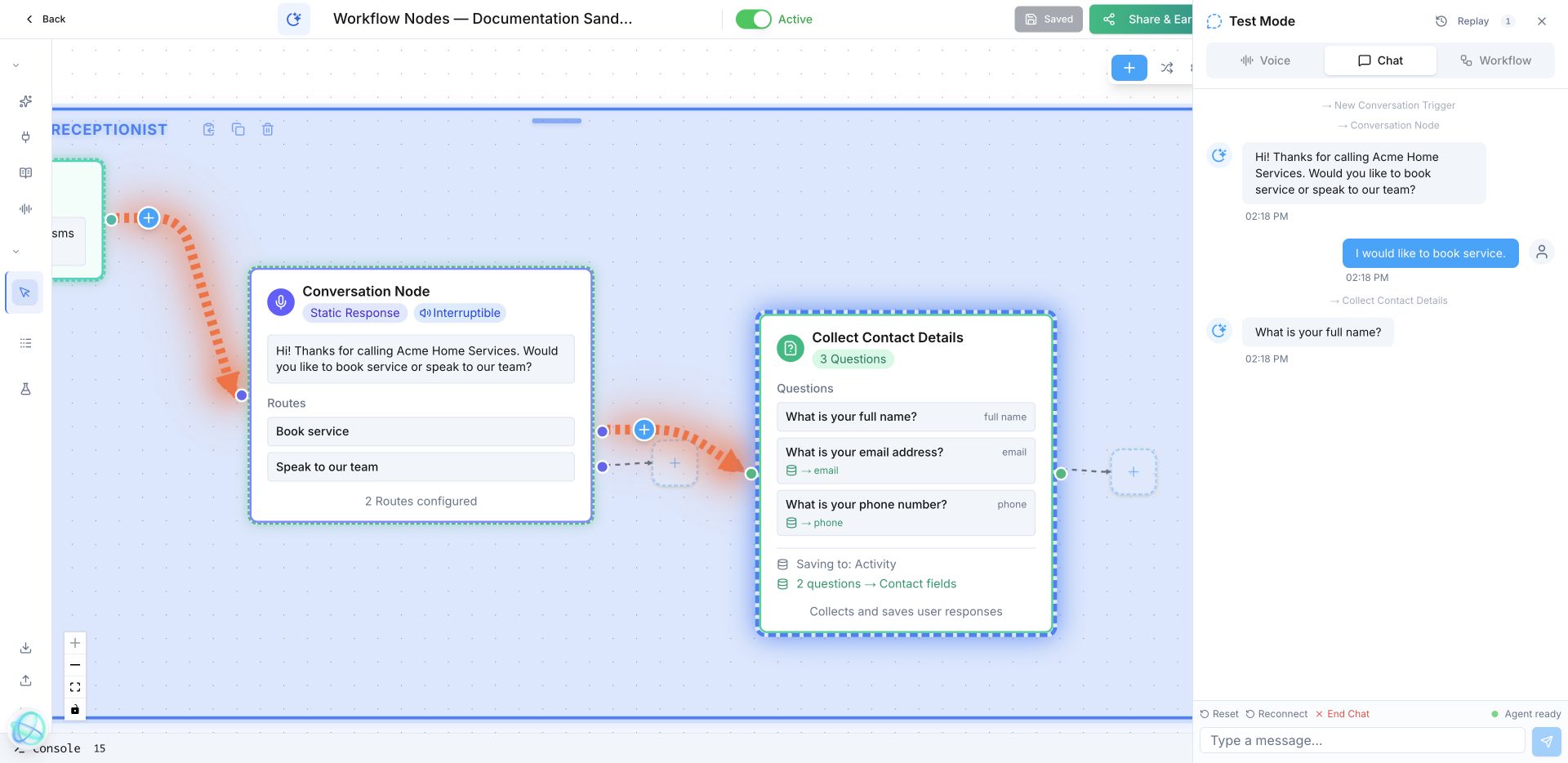
What is your full name? Then ask: What is your email address? Finally: What is your phone number?
What does Ask and Save look like in a real call?
An HVAC agent asks, “What is the service address?” then saves the answer before checking the right technician’s availability.
How do I set up Ask and Save in Votel?
- Put Ask & Save immediately after the question it supports.
- Ask for one thing at a time in everyday language.
- Choose the contact field or workflow variable that should receive the answer.
- Decide what happens if the caller does not answer or gives an unusable answer.
Step by step, from Votel's docs and our sandbox run
- Write the question in plain words. One question per node keeps validation simple.
- Pick the field type that matches the answer: Text, Number, Email, Phone, Date, Dropdown / Selection, or Yes / No.
- Choose where the answer goes. A workflow variable is available to every later node in this run. A contact field stays on the profile for future conversations and workflows. You can pick both.
- If no standard field fits, create a custom field before you build. Votel's examples are policy number, preferred language, service tier and property address.
- Add conditional questions where the next question depends on the answer. The docs' example asks about home size after Residential and business type after Commercial.
- Test with a wrong answer on purpose. In our September 17 sandbox run, a phone number that was too short was rejected and asked again before the flow reached End.
Which field types can Ask and Save validate?
| Field type | What it captures | Example |
|---|---|---|
| Text | Free-form text | Name, company, reason for calling |
| Number | Numeric values | Account number, quantity, age |
| Email addresses | jamie@example.com | |
| Phone | Phone numbers | (555) 123-4567 |
| Date | Dates and times | March 15, next Tuesday, 3pm |
| Dropdown / Selection | One option from a list you define | Department, service tier, location |
| Yes / No | A yes or no confirmation | "Would you like to proceed?" |
Field types and examples follow Votel's Ask and Save documentation. The validation is the point: a Number field will not accept "around twenty", so the agent asks again instead of saving junk.
What should come after Ask and Save?
After this block, use the saved field or variable, then a Decision, booking step, or CRM update.
When should I use Extract Dynamic Variables instead of Ask and Save?
Use Extract Dynamic Variables when details arrive naturally across several sentences and may change mid-conversation.
Ask and Save collects one specific answer to one specific question. Extract Dynamic Variables asks nothing. It reads the whole transcript afterwards and can pull several values at once, which suits takeout orders and stories told out of order.
If you already know the question, Ask and Save is the safer choice because the field type checks the reply. Votel's docs do not describe the same type validation for extracted values.
Why does Ask and Save keep asking the same question?
- The reply does not match the field type. Votel re-asks when validation fails, for example text where a Number is expected. A street address belongs in Text, not Number.
- The question invites the wrong kind of answer. "What's the best number?" can get a time or a count back. "What phone number should we text?" cannot.
- The answer never shows up on the contact. A workflow variable lasts for this run only. Turn on the contact field option if your team needs to see it later.
- The field you want is not in the list. Custom fields have to exist before the node can use them. Create it, then reopen the node.
- A caller refuses to answer. docs.votel.ai does not say how many times the agent re-asks before moving on, so we have not stated a limit. Test a caller who says "I'd rather not" and watch where the run goes.
Frequently asked questions about Ask & Save
What field types can Ask and Save validate?
Votel's docs list seven: Text, Number, Email, Phone, Date, Dropdown / Selection, and Yes / No.
Can Ask and Save write to a variable and a contact field at the same time?
Yes. The docs say you can save to both at once. The variable is available to later nodes in the same workflow, and the contact field stays on the profile.
What happens if the caller gives an invalid answer?
The agent asks the question again. In our sandbox test, a phone number that was too short was rejected and asked again before the workflow moved on.
Can the next question change based on an earlier answer?
Yes. Votel supports conditional questions, so choosing Residential can lead to a home size question while Commercial leads to a business type question.
Sources: Ask and Save Node, Update Contact Node on docs.votel.ai, checked October 19, 2026. Where the docs are silent, this page says so instead of guessing.
Before you publish or activate: verify the current builder labels in Votel and test with dummy data. This independent guide describes the purpose and a safe setup approach; it does not replace Votel’s current product documentation or compliance advice.
Related blocks
- Extract Dynamic Variables: Pulls several useful details from a natural conversation and saves them as structured fields.
- Conversation Node: Lets your agent reply, ask the next useful question, and route people by what they mean.
- Update Contact & Set Pipeline: Keeps the contact record and sales process in sync with what the workflow learned or completed.