What does the Conversation Node do in Votel?
The Conversation Node is the main building block for what your agent says. It replies with either a static script or an AI-generated response, then routes the conversation by intent using routes you define with titles, synonyms and optional fine-tuning instructions. Auto-Continue, Stay on Node and Interruptions control the pacing.
When should I use a Conversation Node?
Use it when a person needs a natural first response instead of a rigid menu.
Working example
Working example: service intake. Tested in the Votel chat simulator with dummy data on September 17, 2026. The Book service route asked for name, email, and phone; invalid phone input was rejected before the flow reached End. Ask & Save was set to Static Response and Save to Activity Log.
Conversation Started → Conversation Node → “Book service” → Ask & Save → End
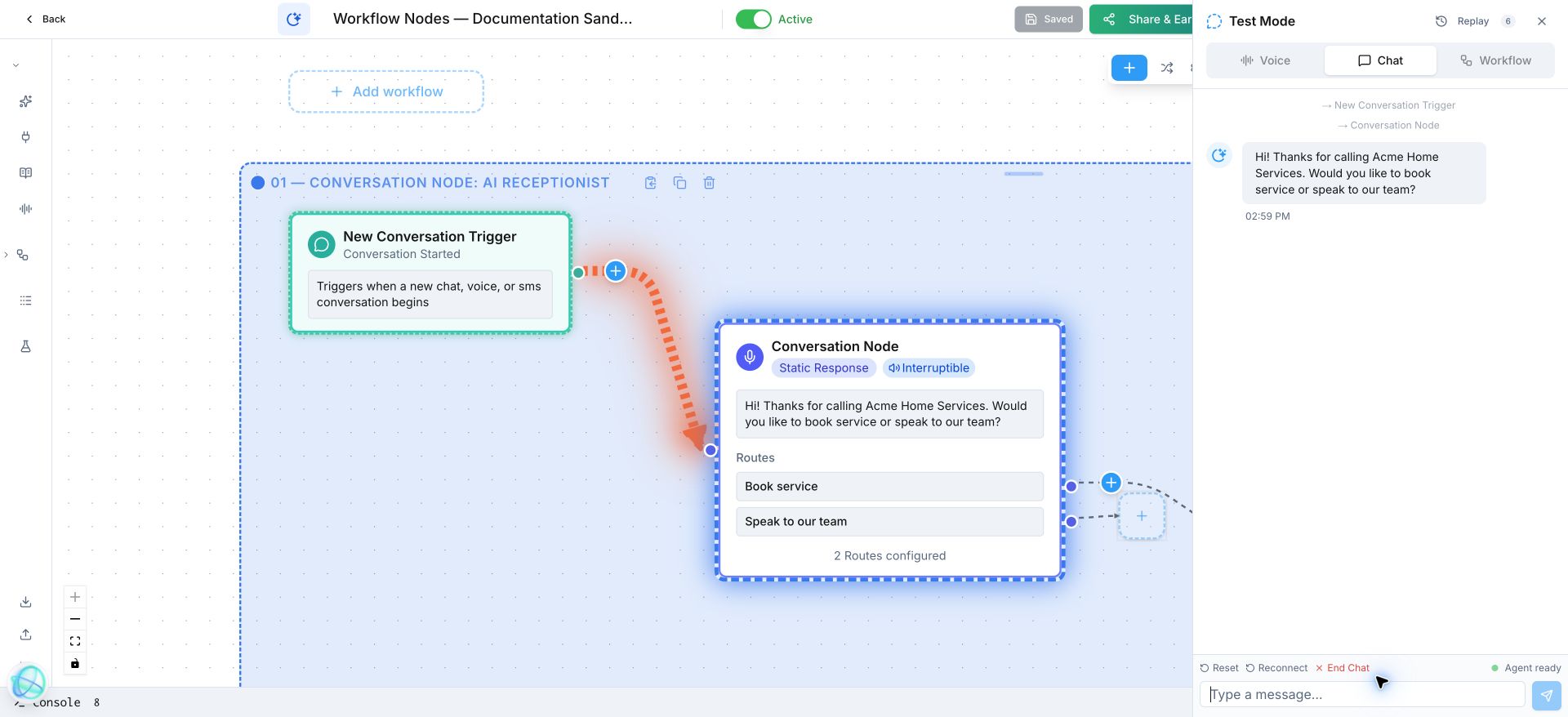
Hi! Thanks for calling Acme Home Services. Would you like to book service or speak to our team?
What does a Conversation Node look like in a real call?
A plumbing caller says, “My basement is flooding.” The agent responds with the emergency script and routes the call to urgent service.
How do I set up a Conversation Node in Votel?
- Add a Conversation Node after your trigger.
- Write the greeting and the one question that moves the conversation forward.
- Create routes for the few outcomes you can actually handle, with plain-language examples.
- Keep an “I’m not sure” route on the node or send it to a person.
Step by step, from Votel's docs
- Choose the response type. Static says the same text every time, which suits greetings and disclaimers. AI-generated adapts to the conversation and is the more common choice.
- For AI-generated responses, write the instruction, for example "Ask the caller how you can help them today."
- Add routes. Each one has a title (the intent, such as Sales), synonyms, and optional fine-tuning instructions.
- Fill in synonyms people actually say. For a Schedule Appointment route, the docs suggest "book a time", "set up a meeting", "make an appointment" and "reserve a slot".
- Decide the pacing: Auto-Continue for statements that need no reply, Stay on Node when the caller must pick a route, and Interruptions off for anything that has to be heard in full.
What settings does the Votel Conversation Node have?
| Setting | What it does |
|---|---|
| Response type | Static (same text every time) or AI-generated (adapts to context and your instructions). |
| Routes | Branches by caller intent. Each route has its own output connection. |
| Synonyms | Other words and phrases that should match a route. The AI uses them alongside the title. |
| Fine-tuning instructions | Optional guidance that helps the AI classify the intent more accurately. |
| Auto-Continue | Moves to the next node as soon as the agent finishes speaking, without waiting for a reply. |
| Stay on Node | Keeps the conversation on this node, rephrasing or clarifying, until the reply matches a route. |
| Interruptions | Enabled lets the caller talk over the agent. Disabled makes the agent finish first, which suits disclosures. |
| Global Node | Makes this node reachable from anywhere in the workflow, for requests like "What are your hours?" |
What should come after a Conversation Node?
After this block, use Ask & Save for a specific answer; Classifier if you need to interpret a wider range of language.
When should I use a Decision node instead of a Conversation Node?
Use a Decision node when the rule is exact, such as whether a field is empty.
A Decision node uses no AI. It checks field values with operators such as Equals, Contains or Is Empty and follows the first path that matches. A Conversation Node interprets what the caller just said. If you need to read the whole conversation without asking anything, that is the Classifier's job.
Why is my Conversation Node not routing correctly?
- The conversation moves on before the caller picks a route. Turn on Stay on Node so the agent keeps clarifying until a route matches.
- The agent talks and never waits. Auto-Continue is on. That is right for an announcement and wrong for a question.
- Two routes catch the same phrases. Add distinct synonyms and use the fine-tuning instructions to say how to tell them apart.
- A disclaimer gets cut off. Interruptions are enabled. Disable them on that one node only, so the rest of the call still feels natural.
- Callers ask off-topic questions mid-flow. Handle them with a Global Node instead of adding a route to every node.
- Testing is slow. Use Agent Replay to edit a node and rewind to it without restarting the test.
Frequently asked questions about Conversation Node
What is the difference between static and AI-generated responses?
A static response says the exact same text every time the node runs. An AI-generated response is written in the moment from the conversation context and the instructions you give the node.
What does Stay on Node do in Votel?
It keeps the conversation inside the node until the caller's reply matches one of your routes. The agent rephrases, clarifies or repeats information instead of moving on too early.
What does Auto-Continue do?
It sends the workflow to the next connected node as soon as the agent finishes speaking, without waiting for a reply. Use it for informational messages or to chain statements.
Can a Conversation Node be reached from anywhere in the workflow?
Yes. Mark it as a Global Node and it can be triggered from anywhere, not only from directly connected nodes.
Sources: Conversation Node, Decision Node, Classifier Node on docs.votel.ai, checked October 19, 2026. Where the docs are silent, this page says so instead of guessing.
Before you publish or activate: verify the current builder labels in Votel and test with dummy data. This independent guide describes the purpose and a safe setup approach; it does not replace Votel’s current product documentation or compliance advice.
Related blocks
- Classifier: Uses an LLM to read natural language and select one predefined outcome, such as booking, emergency, team, or opt-out.
- Ask & Save: Asks one clear question and saves the answer where the rest of the workflow can use it.
- Agent Replay: Edit a response, rewind to that conversation checkpoint, and test the corrected answer without restarting the conversation.