What does the DND Contact node do in Votel?
The DND (Do Not Disturb) / Opt-Out node sets communication flags on a contact's record. You can block phone calls, SMS, email, or all channels at once. Once a flag is set, Votel will not send outbound communication to that contact on the flagged channels. Place it right after the workflow detects an opt-out.
When should I use the DND node?
Use it immediately when someone says stop, unsubscribe, or otherwise withdraws permission.
Working example
Working example: block email and text, then try to send. Tested in the Votel workflow simulator on October 19, 2026 with a synthetic contact. DND Contact, set to Enable for Emails and Text Messages, finished in about 0.2 seconds, and the contact record then showed do-not-email and do-not-text on, with calls untouched. In a follow-up run, the SMS and Email steps logged "Cannot send: DND is active" and the workflow carried on to End. Nothing was sent: the sandbox has no phone number or email sender connected.
Manual trigger → DND Contact (Enable · Emails, Text Messages) → End
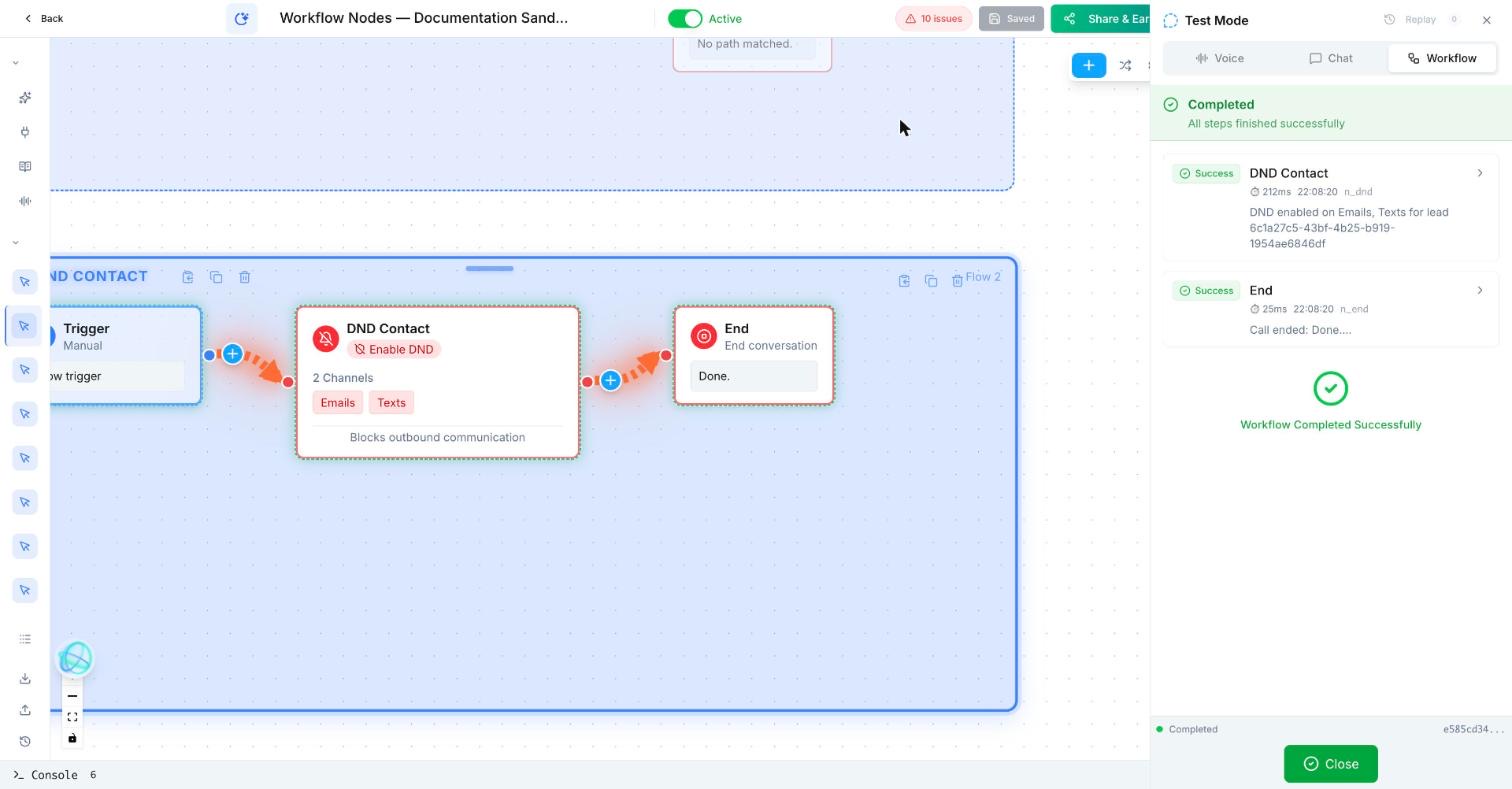
Trigger: Manual
DND Contact
  Action: Enable DND
  Channels: Emails, Text Messages (Calls left off)
End: "Done."
Check afterwards: the test contact shows do not email and do not text on.
To undo: clear the flags on the contact profile, or run the node with Disable DND.
What does an opt-out flow look like?
A prospect replies “STOP.” The workflow sets DND for SMS and confirms the opt-out without sending another promotional sequence.
How do I set DND on a contact in a Votel workflow?
- Make an opt-out route in your conversation or classifier.
- Apply DND to the channel or channels the person has opted out of.
- End or deactivate related follow-up paths where appropriate.
- Test the result with dummy contacts only.
Step by step, from Votel's docs
- Detect the opt-out. That can be a Conversation Node or Classifier route for "stop calling me", or a separate workflow triggered when a contact replies STOP to an SMS.
- Put the DND node immediately after the detection. The docs say not to add unnecessary steps between the request and the action.
- Pick the channels: phone calls, SMS, email, or all channels. Match what the person asked for. "Email only, please" means DND on phone and SMS while email stays open.
- Add an Add Note node that records why and when DND was set, as the docs recommend.
- If the contact is in a drip or campaign, add Deactivate From Workflow so pending steps are cancelled too.
Which channels can the DND node block?
| Option | Effect |
|---|---|
| Phone calls | Blocks outbound calls to this contact. |
| SMS | Blocks outbound text messages. |
| Blocks outbound emails. | |
| All channels | Blocks all outbound communication. |
The flag lives on the contact record, not in the workflow, so it applies to every later workflow that tries to reach that contact on a flagged channel. It can be removed by hand from the contact's profile if the person opts back in.
What should come after the DND node?
After this block, use a confirmation, Deactivate From Workflow, and a note for the team.
Is the DND node enough for compliance?
Never use it as a substitute for your own consent, legal, and compliance review.
It handles the mechanics of an opt-out quickly and the same way every time, which is what Votel's docs mean by keeping compliance consistent. What counts as consent, which messages you may still send, and how long you keep records are questions for your own legal review. This guide does not give compliance advice.
Why is a contact still getting messages after DND?
- The wrong channel was flagged. An SMS STOP sets SMS DND, which does not stop calls. Check which channels the node sets on each route.
- Something ran first. If a message node sits between the opt-out and the DND node, it fires before the flag exists. Move DND up.
- Someone removed the flag. DND can be cleared manually from the contact profile. Check the contact sidebar before blaming the workflow.
- Steps were already queued in another workflow. The DND docs do not say whether queued items elsewhere are cancelled. Deactivate From Workflow does cancel scheduled calls, waiting timers and queued messages, so use both.
Frequently asked questions about DND Contact
Which channels can the Votel DND node block?
Phone calls, SMS and email, one at a time or together, plus an all channels option that blocks every outbound channel.
Can DND be removed if someone opts back in?
Yes. Votel's docs say the DND flag can be removed manually from the contact's profile.
Should I log why DND was set?
Votel recommends pairing the DND node with an Add Note node that records the reason and the date the contact asked to stop.
Does the DND node remove the contact from running workflows?
Not in our test. In a sandbox run on October 19, 2026, the workflow kept going after DND was set. The SMS and Email steps that followed were skipped with "Cannot send: DND is active", and the run still reached End. Use Deactivate From Workflow as well if you need the contact's pending calls, timers and messages cancelled.
Sources: DND / Opt-Out Node, Deactivate from Workflow Node on docs.votel.ai, checked October 19, 2026. Where the docs are silent, this page says so instead of guessing.
Before you publish or activate: verify the current builder labels in Votel and test with dummy data. This independent guide describes the purpose and a safe setup approach; it does not replace Votel’s current product documentation or compliance advice.
Related blocks
- SMS & Email: Sends a prepared message to the contact through the channel that makes sense for the moment.
- Update Contact & Set Pipeline: Keeps the contact record and sales process in sync with what the workflow learned or completed.
- Classifier: Uses an LLM to read natural language and select one predefined outcome, such as booking, emergency, team, or opt-out.