How do the SMS and Email nodes work in Votel?
The SMS and Email nodes send messages from a workflow. Both let you pick the sender and the recipient, send immediately or on a schedule, and wait for a reply with a timeout path. SMS adds spin text, AI-generated content and MMS images by URL. Email adds a subject line, a rich text body and attachments by URL.
When should I send an SMS or email from a Votel workflow?
Use it for confirmations, reminders, summaries, and human follow-up, not as a substitute for consent.
Working example
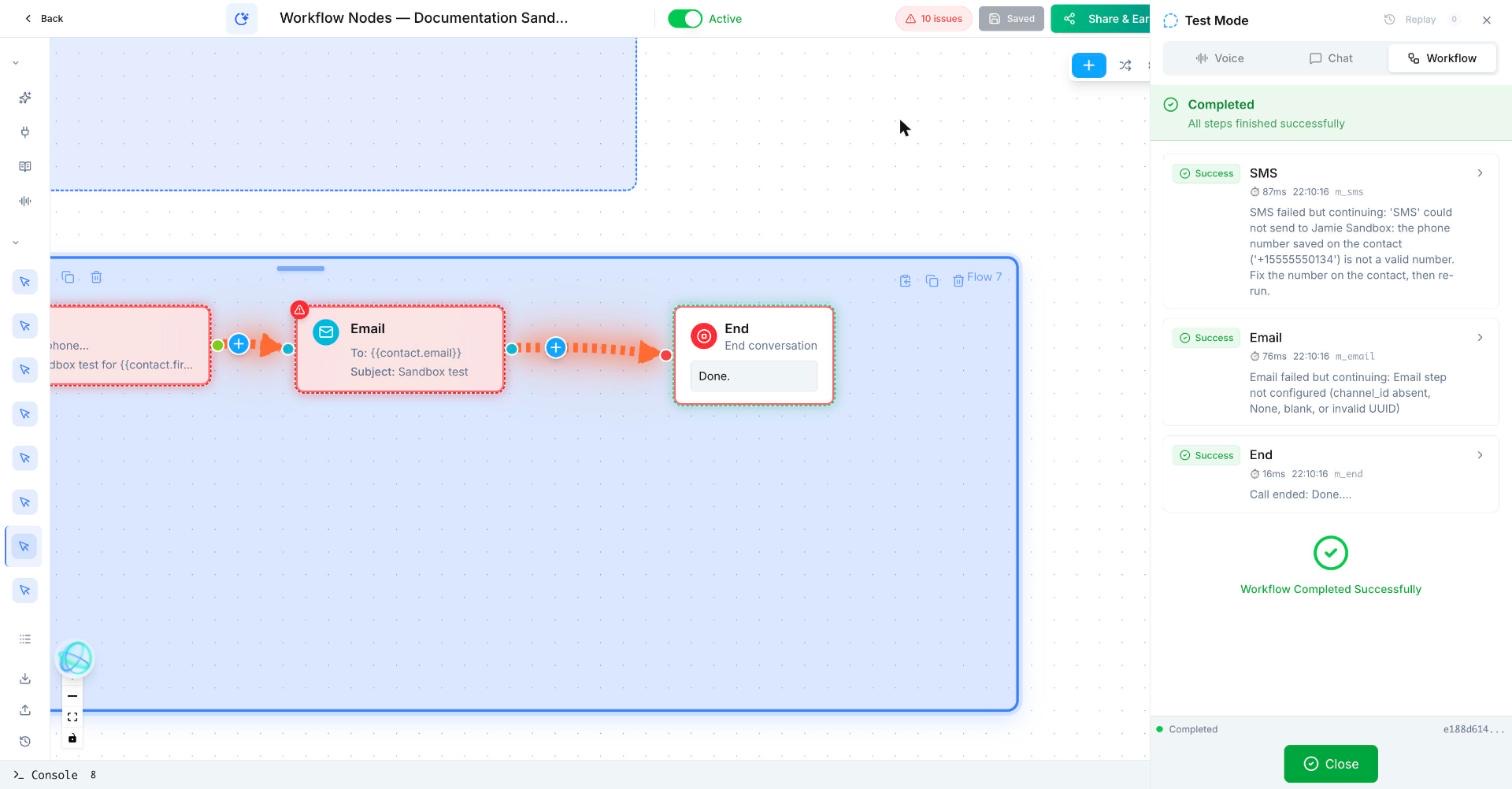
Working example: what SMS and Email do with no channel. Tested in the Votel workflow simulator on October 19, 2026 with a synthetic contact. The sandbox has no phone number and no email sender, so live sending was impossible by design. SMS rejected the fictional 555 number as "not a valid number", and Email reported the step was not configured because no channel was set. Both steps logged "failed but continuing" and the run reached End. In a second run with DND on for the contact, both steps stopped on DND first. No message was sent in either run.
Manual trigger → SMS → Email → End
Trigger: Manual
SMS
  To: {{contact.phone}}
  Message: Sandbox test for {{contact.first_name}}. Not a real message.
  Send: Immediately
Email
  To: {{contact.email}}
  Subject: Sandbox test
  Body: Sandbox test for {{contact.first_name}}. Not a real message.
End
Use a test contact with a fictional number and an example.com address.What does a follow-up message look like?
After a quote request, a contractor sends a short SMS: “Thanks, Jamie. We have your details and will call by 3 PM.”
How do I set up the SMS and Email nodes in Votel?
- Choose the channel based on consent and urgency.
- Keep the message specific, short, and tied to the previous step.
- Insert only variables you have actually saved and tested.
- Provide opt-out handling and avoid sending from a live workflow during documentation tests.
SMS node, from Votel's docs
- Pick From, the phone number the text comes from, and To, usually the current contact, though another number or a variable works.
- Choose the content type: Static with variables, Spin Text with several versions picked at random, or AI Generated from the conversation and your instructions.
- Add an image URL if you want it sent as MMS, such as a map, a flyer or a QR code.
- Set timing to Immediately or Scheduled.
- Turn on Wait for Reply if the workflow should pause for an answer, and set a timeout.
Email node, from Votel's docs
- Pick a From sender identity. It must be verified in your account.
- Set To, usually from the contact profile, or a variable or a fixed address.
- Write the subject with variables, for example
{{first_name}}, here is your appointment confirmation. - Write the body in the rich text editor with headings, lists, links, images and variables. Attach files by URL.
- Set timing and, if needed, Wait for Reply with a timeout.
What settings do the SMS and Email nodes have?
| Setting | SMS node | Email node |
|---|---|---|
| Sender | A phone number sender identity | A verified sender identity |
| Content | Static, Spin Text or AI Generated | Subject plus rich text body |
| Media | MMS image by URL | Attachments by URL, plus links and images in the body |
| Timing | Immediately or Scheduled | Immediately or Scheduled |
| Wait for Reply | Pauses until a reply, with a timeout path | Pauses until a reply, with a timeout path |
With Wait for Reply on, the reply is available as a variable to the next node. If the timeout runs out first, the workflow follows a separate timeout path.
What should come after an SMS or Email node?
After this block, use a Wait For Time, Decision, task, or a different workflow trigger from the reply.
When should I use SMS Notification instead of the SMS node?
Use SMS Notification for quick one-off texts before your 10DLC registration is approved, such as a booking confirmation or an alert to a team member's phone. Votel's docs say it does not need 10DLC, but it is not suitable for marketing, bulk messaging or drip sequences. Once 10DLC is approved, use the SMS node for ongoing messaging.
| SMS Notification | SMS node | |
|---|---|---|
| 10DLC required | No | Yes |
| Best for | Quick one-off notifications | Ongoing messaging and campaigns |
| Example | Appointment confirmation, internal alert | Follow-ups, drip sequences, outreach |
Why is my Votel SMS or email not sending?
- The email sender is not verified. The From address must be a verified sender identity in your account.
- Your 10DLC registration is still pending. The SMS node needs it. For day-one confirmations, the docs point to SMS Notification.
- The contact has DND on that channel. Votel will not send to a flagged channel. In our sandbox the run log said "Cannot send: DND is active for Text Messages" and the workflow moved on to the next step.
- The run finished but nothing went out. With error handling set to continue, a failed send does not stop the workflow. Open the step in the run log. Our sandbox showed "SMS failed but continuing" for an invalid number and "Email step not configured" when no sender was set.
- A variable prints blank.
{{first_name}}is only filled if the contact or an earlier node has a value. - The workflow seems stuck. Wait for Reply is on. Make sure the timeout is set and the timeout path is connected.
- A summary email is thin. The docs suggest a scheduled send, for example 10 minutes after the call ends, so the system has time to process the conversation.
Frequently asked questions about SMS & Email
What is Spin Text in a Votel SMS?
You write several versions of a message and the system picks one at random each time. It helps with A/B testing and keeps repeat outreach from feeling copy-pasted.
Can a Votel workflow send MMS?
Yes. Add an image URL to the SMS node and the message is sent as MMS. Photos, maps, flyers and QR codes are the docs' examples.
Do I need 10DLC to send SMS from a Votel workflow?
The SMS node requires 10DLC. The SMS Notification node does not, but it is only for transactional, one-off notifications.
How does Wait for Reply work?
It pauses the workflow until the contact replies. The reply is available as a variable to the next node, and a timeout sends the workflow down a separate path if no reply arrives.
Does a failed SMS or email stop the Votel workflow?
Not in our test. In a sandbox run on October 19, 2026, an SMS to an invalid number and an email with no sender both logged "failed but continuing", and the workflow carried on to the next step. Check the run log rather than assuming a finished run means the message went out.
Sources: SMS Node, Email Node, SMS Notification Node on docs.votel.ai, checked October 19, 2026. Where the docs are silent, this page says so instead of guessing.
Before you publish or activate: verify the current builder labels in Votel and test with dummy data. This independent guide describes the purpose and a safe setup approach; it does not replace Votel’s current product documentation or compliance advice.
Related blocks
- Wait For Time & Follow Up Later: Pauses work until a defined time or schedules the next touch without making the workflow busy-wait.
- DND Contact: Stops future outreach on the selected channels for a contact who opts out.
- Generate Content: Creates a reusable piece of text from instructions and saved context, then stores it as an output variable.