What does the Outbound Call node do in Votel?
The Outbound Call node places a phone call to the contact from inside a workflow. You pick the caller ID, either one number or a rotating number pool, and the node splits into four outcome branches: Answer, No Answer, Voicemail and Failed. Each branch leads to its own next step, such as a retry or a text.
When should I use the Outbound Call node?
Use it for targeted follow-up when a call is more useful than another text.
Working example
Working example: a call that cannot be placed lands on Failed. Tested in the Votel workflow simulator on October 19, 2026 with a synthetic contact. The sandbox has no phone numbers, so no call could be placed. The Outbound Call node took its Failed output in 55 milliseconds, and its debug log gave the reason: an outbound call with No Transfer needs another workflow with a Conversation Started trigger to handle the call. Answer, No Answer and Voicemail were not exercised, because they need a real call.
Manual trigger → Outbound Call → Failed → End
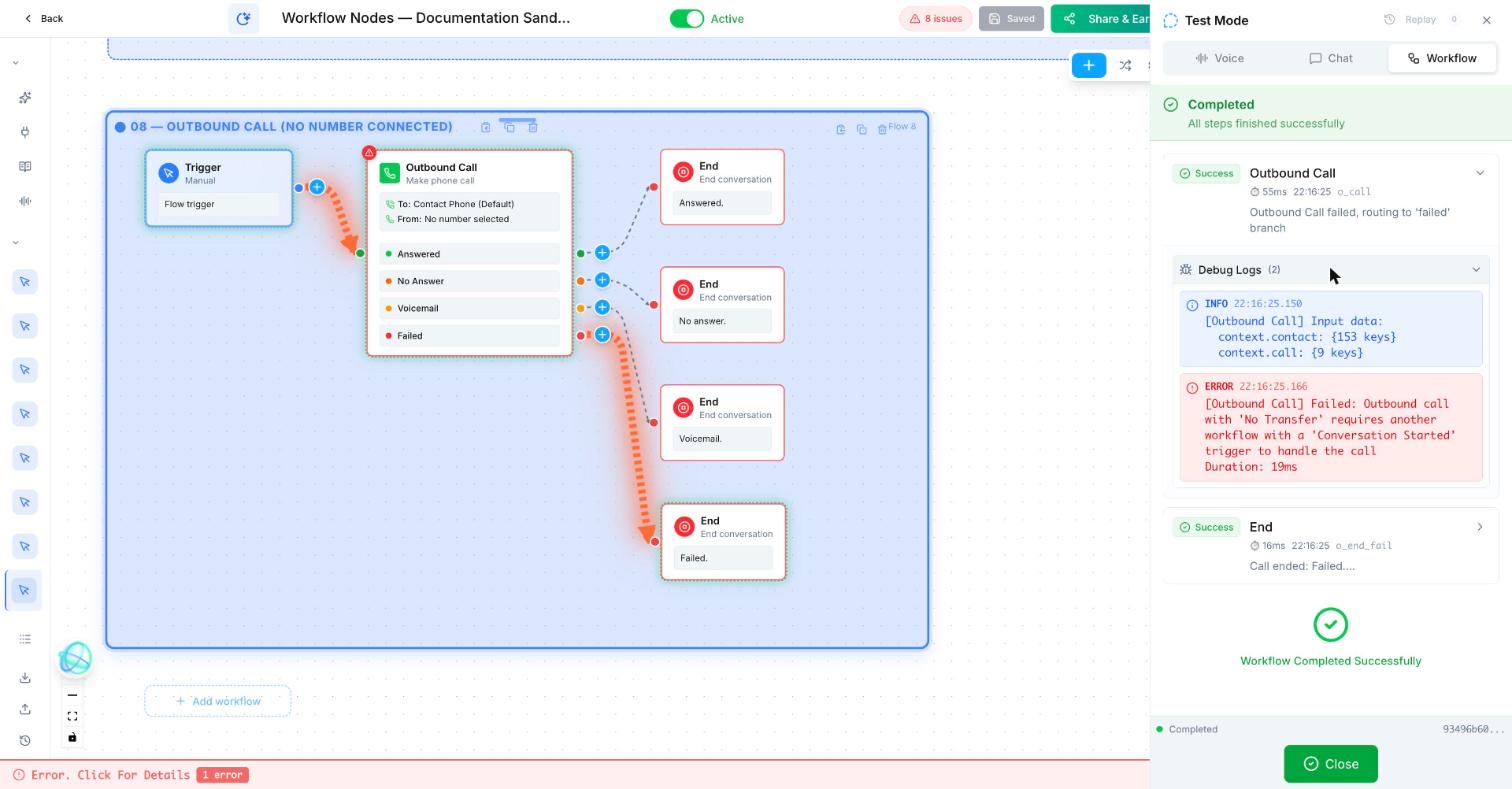
Trigger: Manual
Outbound Call
  To: Contact phone (default)
  From: none selected (the sandbox has no numbers)
  Answered → End: "Answered."
  No Answer → End: "No answer."
  Voicemail → End: "Voicemail."
  Failed → End: "Failed."
Before a real test: build the conversation workflow with a Conversation Started trigger, pick a From number, and call a phone you own.
What does an outbound follow-up look like?
A consultation request gets one timely callback. If there is no answer, the workflow waits and sends a polite SMS with a booking link.
How do I set up an outbound call in Votel?
- Use a test contact and a safe test number first.
- Write a specific action for every result: answered, no answer, voicemail, and failed.
- For an answered call, send the person into the appropriate conversation flow.
- Respect consent and local calling rules before activating it.
Step by step, from Votel's docs
- Build the outreach workflow with a Manual Trigger and the Outbound Call node.
- Choose the caller ID: a specific registered number, or a number pool that rotates through a set of numbers.
- Connect all four branches: Answer, No Answer, Voicemail and Failed.
- Build a separate conversation workflow that starts with a Conversation Started trigger. That workflow runs the actual conversation when the contact picks up.
- Space retries with a Wait for Time node so contacts are not called back to back.
What are the Outbound Call node's outcome branches?
| Branch | When it fires | A sensible next step |
|---|---|---|
| Answer | The contact picks up. | Your conversation workflow takes over. |
| No Answer | The call rings but nobody answers. | Wait, then retry. |
| Voicemail | A voicemail system is detected. | Send a follow-up SMS, as the docs suggest. |
| Failed | The call could not connect: invalid number, carrier issue and similar. | Flag the contact for review. |
Why do Votel outbound campaigns use two workflows?
The docs describe an outreach workflow (Manual Trigger plus Outbound Call) that handles timing, retries and spacing, and a conversation workflow (Conversation Started trigger) that handles what the agent says once someone answers. Keeping them apart means you can change your retry schedule without touching the script, and the reverse.
What should each Outbound Call branch do?
Every branch needs a destination, even if it is just End. The docs pair No Answer with a Wait for Time node before a retry, and Voicemail with an SMS. Answer hands off to the conversation workflow. Failed usually means a bad number or a carrier problem, so an instant retry rarely helps.
When should I text instead of call?
Use SMS or Email first when a call would be unexpected or you do not have clear permission.
A call is the most interruptive thing a workflow can do. If the contact has not asked to be called, or a text would do the job, start there. Remember that a contact with a phone DND flag will not receive outbound calls at all.
Why is my Votel outbound call not connecting?
- It lands on Failed. The docs list an invalid number or a carrier issue. Setup problems end up there too: in our sandbox run, a node with no conversation workflow to hand the call to failed before dialing, and the step's debug log named the missing Conversation Started workflow. Open the debug log first.
- The contact answers and the agent says nothing. Check the conversation workflow with the Conversation Started trigger exists and is active.
- Answer rates are low. The docs suggest monitoring answer rates and adjusting your number pool or call timing.
- Everyone gets called at once. Use drip timing so the list is spread out, as the Wait node docs recommend for campaigns.
- Calls never start for some contacts. A phone DND flag blocks outbound calls. That is working as intended.
Frequently asked questions about Outbound Call
What are the Outbound Call node's outcome branches?
Four: Answer when the contact picks up, No Answer when it rings out, Voicemail when a voicemail system is detected, and Failed when the call cannot connect.
What is a number pool in Votel?
A set of your numbers that the Outbound Call node rotates through as caller ID. Votel's docs say it helps improve answer rates and avoid spam flagging.
Why do outbound campaigns use two workflows?
One workflow places the calls and manages retries. A second, started by the Conversation Started trigger, runs the conversation when someone answers. That keeps outreach logic and conversation logic separate.
How do I retry an unanswered call?
Connect the No Answer branch to a Wait for Time node, then to another Outbound Call node, so attempts are spaced out.
What does a Votel outbound call need before it can dial?
From our sandbox run on October 19, 2026: a conversation workflow with a Conversation Started trigger to handle the answered call. Without one, the node took the Failed output and logged that requirement. You also need a number to call from, which the sandbox did not have.
Sources: Outbound Call Node, Wait for Time Node, DND / Opt-Out Node on docs.votel.ai, checked October 19, 2026. Where the docs are silent, this page says so instead of guessing.
Before you publish or activate: verify the current builder labels in Votel and test with dummy data. This independent guide describes the purpose and a safe setup approach; it does not replace Votel’s current product documentation or compliance advice.
Related blocks
- Call Forwarding: Transfers a live call from the AI to a person or phone team.
- Wait For Time & Follow Up Later: Pauses work until a defined time or schedules the next touch without making the workflow busy-wait.
- SMS & Email: Sends a prepared message to the contact through the channel that makes sense for the moment.