What does the Call Forwarding node do in Votel?
Call Forwarding transfers a live call from the AI agent to a person or an outside phone number. You choose a ring strategy (Ring All, Sequential or AI Picks), can play a private whisper message to whoever answers, require a confirm key so voicemail cannot pick up, and limit forwarding to the hours you set.
When should I forward a call to a human in Votel?
Use it when a caller needs a licensed professional, an urgent response, or human judgment.
Working example
Working example: a transfer request in the chat simulator. Tested in the Votel chat simulator on October 19, 2026. The canvas shows three outputs: Call Answered, No Answer and Outside Hours. Our rule allowed forwarding Monday to Friday, 9:00 to 17:00 Toronto time, to a fictional 555 number. At 10:26 pm on a Monday the caller asked for a person and the simulator took No Answer, not Outside Hours, so the text simulator did not apply the schedule. Nothing was dialed: the sandbox has no number to call from, and a live transfer cannot be completed in chat.
Conversation Started → Offer a person → Call Forwarding → No Answer → End
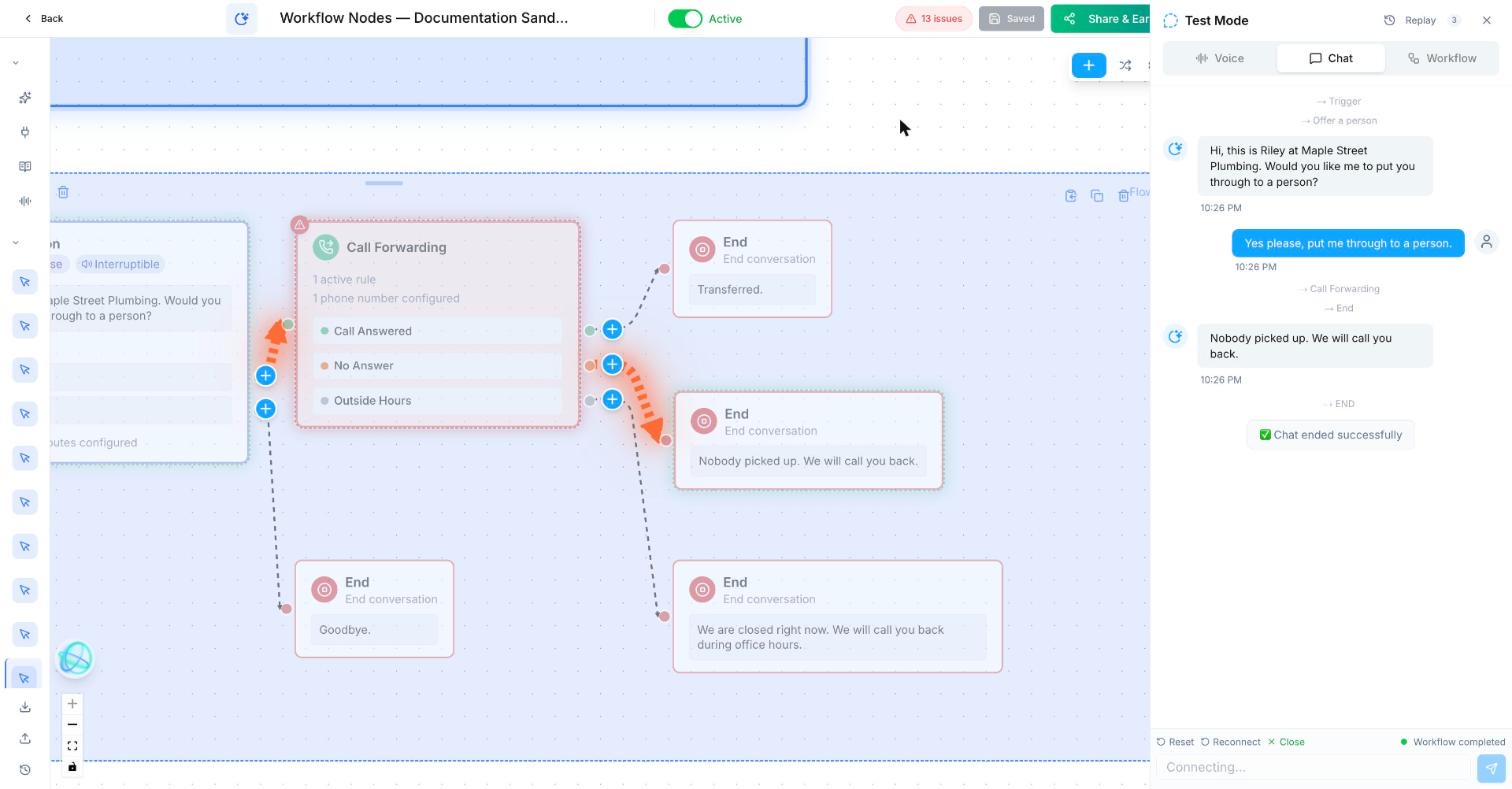
Trigger: Conversation Started
Talking step (static): Hi, this is Riley at Maple Street Plumbing. Would you like me to put you through to a person?
  Routes: Wants a person → Call Forwarding; Anything else → End
Call Forwarding
  Rule: Office hours, simultaneous ring, cold transfer
  Number: a test phone you own (we used a fictional 555 number)
  Hours: Mon to Fri, 09:00 to 17:00, America/Toronto
  Call Answered → End: "Transferred."
  No Answer → End: "Nobody picked up. We will call you back."
  Outside Hours → End: "We are closed right now. We will call you back during office hours."
Test hours and the transfer itself with a voice call to a test number, not in chat.
What does a call transfer look like in practice?
A caller asking about a complex insurance claim is transferred to the on-call advisor after the agent captures their name and policy number.
How do I set up Call Forwarding in Votel?
- Add the person or team destination and the correct timezone rules.
- Choose ring-all, sequential, or AI-picks based on who should answer.
- Turn on a confirmation key so voicemail greetings do not count as a human answer.
- Use a brief whisper only when the recipient needs context before joining.
Step by step, from Votel's docs
- Add the numbers of the people or lines that can take the call.
- Pick a ring strategy. Ring All rings everyone and connects the first to pick up. Sequential rings one number at a time in your order. AI Picks chooses a person from a list where you describe each person's expertise.
- Write a whisper message, one sentence on what the call is about. The person hears it before they are connected. The caller does not.
- Turn on the confirm key so the person has to press a key, such as 1, to accept.
- Set the ring timeout. The docs say the default is typically 30 seconds.
- Add schedule rules for the hours someone can actually answer.
What settings does Votel Call Forwarding have?
| Setting | What it does | When it matters |
|---|---|---|
| Ring All | Rings every configured number at once. First to answer gets the caller. | Any team member can handle the call. |
| Sequential | Rings numbers one at a time, in your order. | Try the account manager first, then the support line. |
| AI Picks | The AI matches the caller's need to a person from your descriptions. | Billing questions go to billing, setup questions go to tech support. |
| Whisper message | A short audio brief played only to the person answering. | "This caller is asking about upgrading their subscription." |
| Confirm key | The person must press a key to accept the call. | Stops a voicemail box from "answering" and stranding the caller. |
| Ring timeout | How long each number rings before the system gives up or moves on. | Default is typically 30 seconds. |
| Schedule rules | Restricts forwarding to set hours. | Outside the schedule, the workflow skips this node. |
What happens if nobody answers a forwarded call?
Plan the miss before you plan the hit. Votel's docs say a call outside your schedule rules skips the forwarding node and continues to the next connected node, so put a voicemail prompt, an SMS or a task there. With Sequential, an unanswered or unconfirmed number moves on to the next one. The docs do not spell out which path the workflow takes after every number has timed out, so test it with a number nobody answers.
When should I use Forward to Agent instead of Call Forwarding?
Use Forward to Agent when the conversation should move to another AI agent instead of a person.
Forward to Agent hands the live call to another AI agent. Call Forwarding is for humans and outside phone numbers. If a caller might ask for a person at any moment, Votel's docs suggest putting the transfer behind a Global Node so it can be reached from anywhere in the conversation, not just one branch.
Why is my Votel call transfer going to voicemail?
- The confirm key is off. Without it, a voicemail greeting can count as an answer and the caller ends up talking to a recording. Turn it on.
- The phone sends calls to voicemail before the timeout. The confirm key is what protects you here, because voicemail cannot press 1.
- Calls skip the transfer entirely. Check the schedule rules. Outside the defined hours, the workflow goes straight past this node. The builder gives the node its own Outside Hours output, so connect it to a message step. The chat simulator did not apply the hours in our test, so check them with a voice call.
- AI Picks routes to the wrong person. The AI only knows what you wrote about each person. "Sales" is vague. "New quotes and pricing questions for residential jobs" is not.
- The person answering is confused. Add or tighten the whisper so they know who is calling and why before they say hello.
Frequently asked questions about Call Forwarding
What ring strategies does Votel Call Forwarding support?
Three: Ring All rings every number at once, Sequential rings them in your order, and AI Picks lets the AI choose the right person from descriptions you provide.
Does the caller hear the whisper message?
No. The whisper plays only to the person receiving the transfer, before they are connected.
What is the confirm key for?
It makes the person press a key, such as 1, before the caller is connected. That stops voicemail systems from picking up a transfer they cannot help with.
What happens to forwarded calls outside business hours?
Votel's docs say forwarding is skipped outside the hours you set. The builder also shows a dedicated Outside Hours output on the node, so connect it to a message or SMS step. In our October 19, 2026 chat-simulator test the run took No Answer outside the hours instead, so confirm the schedule with a voice call.
Sources: Call Forwarding Node, Forward to Agent Node on docs.votel.ai, checked October 19, 2026. Where the docs are silent, this page says so instead of guessing.
Before you publish or activate: verify the current builder labels in Votel and test with dummy data. This independent guide describes the purpose and a safe setup approach; it does not replace Votel’s current product documentation or compliance advice.
Related blocks
- Outbound Call: Places a call and gives you separate paths for answered, no-answer, voicemail, and failed calls.
- Conversation Node: Lets your agent reply, ask the next useful question, and route people by what they mean.
- Smart Calendar Booking: Finds a suitable time and creates an appointment without making the person leave the conversation.