What does the Smart Calendar Booking node do in Votel?
Smart Calendar Booking lets your agent book an appointment inside the conversation. In one node it checks your connected calendar, asks for the details the booking needs, such as preferred time and name, and creates the event. It respects your availability settings, buffer times and booking windows. Answers to custom questions are stored with the appointment.
When should I use Smart Calendar Booking?
Use it when the workflow can safely book a real next step.
Working example
Working example: a booking with no calendar takes the Error path. Tested in the Votel chat simulator on October 19, 2026. In the builder, the node says its time zone comes from the selected calendar ("Timezone is automatically set from your calendar integration") and that it fetches available slots for the next 30 days when reached. The canvas shows two outputs, Success and Error. The sandbox has no calendar connected, so we could not book a real slot. The run went straight down Error and the caller heard the fallback line. No appointment was created.
Conversation Started → Smart Calendar Booking → Success → End, or Error → End
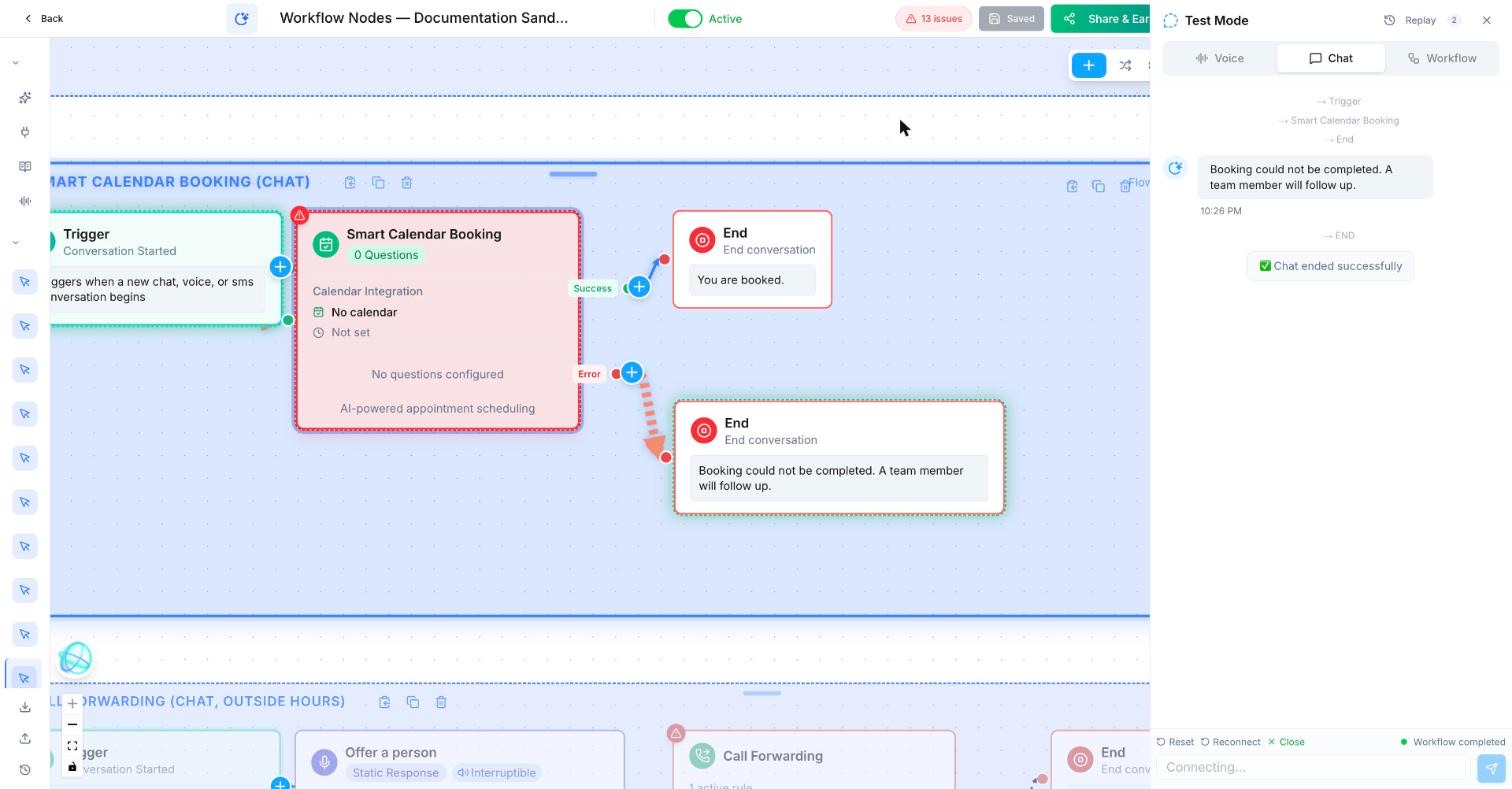
Trigger: Conversation Started
Smart Calendar Booking
  Question delivery: AI Generated
  Calendar account: none connected in the sandbox
  Timezone: from the selected calendar
  Success → End: "You are booked."
  Error → End: "Booking could not be completed. A team member will follow up."
Before a real test: connect a test calendar, not a team member's live one.
What does a booking flow look like in practice?
A salon assistant finds a 60-minute colour appointment with the right stylist, then confirms it by text.
How do I set up Smart Calendar Booking in Votel?
- Connect only the calendar and service that belong to this workflow.
- Set the appointment type, duration, team member rules, and time zone.
- Ask for the details needed before booking.
- Build a fallback for no availability, cancellations, and booking failures.
Step by step, from Votel's docs
- Connect the calendar first. The docs name Google Calendar and any other calendar connected through your integrations.
- Set availability windows, buffer times and booking windows on the calendar so the agent only offers times you can actually take.
- Add the node. It asks for the preferred date and time, the contact's name if it is not known, and any other field your calendar requires. You do not need separate Ask and Save nodes for these.
- Add custom questions for anything you want before confirming: the reason for the visit, service preference, insurance or account details.
- For what happens after the booking, use the Appointment Scheduled trigger in another workflow.
What does Smart Calendar Booking ask and store?
| Part | What it does |
|---|---|
| Required questions | Asked automatically: preferred date and time, name if unknown, and any fields your calendar configuration requires. |
| Custom questions | Your own qualifying questions, asked before the booking is confirmed. Answers are stored with the appointment. |
| Calendar | Real-time availability from a connected calendar, with the event created there. |
| Availability rules | Your availability settings, buffer times and booking windows are respected automatically. |
What should come after a booking?
After this block, use a confirmation message, calendar reminder, pipeline update, or internal preparation task.
When should I use Availability Check instead of Smart Calendar Booking?
Use Availability Check when you only need to show or test availability, not create the booking.
| Availability Check | Smart Calendar Booking | |
|---|---|---|
| Purpose | Look up open slots | Book an appointment |
| Creates events | No | Yes |
| Best for | Presenting options before committing | Completing the booking in one step |
Availability Check is configured with a calendar, a date range (for example the next 7 days) and optional time preferences. Votel's docs suggest it for receptionist flows, multi-provider scheduling and pre-qualification, then Smart Calendar Booking to finish.
Why is the Votel booking node offering the wrong times?
- The availability windows are wrong. The node follows your calendar's availability, buffers and booking windows. Fix them there.
- The calendar is not connected, or the wrong one is. The docs say to connect and configure the integration before using the node.
- Times look shifted by hours. docs.votel.ai does not document a time zone setting on the node. The builder answers it: the Timezone field reads "from selected calendar" and is set automatically from your calendar integration. Fix the time zone on the calendar itself, then book a test slot to confirm.
- No slot is free, or the booking fails. The docs do not describe a failure path, but the builder shows an Error output next to Success. In our sandbox run with no calendar connected, the node went straight to Error. Connect Error to a next step for the caller, then test a fully booked day as well.
- No-shows are high. The docs suggest custom questions to collect commitment and context upfront.
Frequently asked questions about Smart Calendar Booking
Do I need Ask and Save before Smart Calendar Booking?
No. The booking node asks for the preferred date and time, the name if unknown, and any fields your calendar needs on its own.
Which calendars work with Smart Calendar Booking?
Votel's docs name Google Calendar and other calendars connected through your Votel integrations.
Does the Availability Check node create appointments?
No. It only looks up open slots. Use Smart Calendar Booking to create the event.
Where are custom question answers stored?
With the appointment, according to Votel's Smart Calendar Booking documentation.
Which time zone does Smart Calendar Booking use?
The calendar's. The builder labels the node's Timezone field "from selected calendar" and sets it automatically from your calendar integration. docs.votel.ai does not cover this, so book a test slot to confirm.
What happens if a Votel Smart Calendar Booking fails?
The node has a separate Error output in the builder. In our sandbox run on October 19, 2026, with no calendar connected, the run followed Error straight away. docs.votel.ai does not describe this path, so connect it to a message or handoff and test it.
Sources: Smart Calendar Booking Node, Availability Check Node on docs.votel.ai, checked October 19, 2026. Where the docs are silent, this page says so instead of guessing.
Before you publish or activate: verify the current builder labels in Votel and test with dummy data. This independent guide describes the purpose and a safe setup approach; it does not replace Votel’s current product documentation or compliance advice.
Related blocks
- SMS & Email: Sends a prepared message to the contact through the channel that makes sense for the moment.
- Wait For Time & Follow Up Later: Pauses work until a defined time or schedules the next touch without making the workflow busy-wait.
- Decision: Checks a clear rule and sends the workflow down the matching path.