What is database reactivation?
Database reactivation is a campaign that contacts people already in a business's CRM who showed interest and went quiet, to get them booked, buying or replying again. Agencies call it a DBR campaign. Votel's Reactivation Agent now does the outreach and handles the replies. You pick the list, set the offer and get paid for appointments that actually happen.
If you've ever run a DBR, you already know what this is worth. The business spent money on ads, referrals or a website to get those inquiries. Most of them were never followed up properly, so they sit in the CRM doing nothing.
Think about a med spa with 2,000 old inquiries. How many of those people asked about a treatment, got busy and never booked? What would 20 of them showing up be worth to that business? That question is the whole pitch.
Names, numbers and notes nobody has touched in months. Paid for once, never finished.
A few weeks later, some of those people are in the chair. Same list, new revenue.
What the owner is buying
Not "AI outreach." Appointments from leads they thought were dead.
This is one of the easiest offers to sell because the owner has no new money to spend on getting attention. They only need to hand over a list. And when you price it on shows, the risk moves to you.
"Send me the list of everyone who ever inquired and never booked. I'll reach out to them for you. After setup, you only pay me for the people who actually show up."
How a database reactivation campaign works
Pick the right people, reach out a few times, handle replies, book the appointment.
Votel's Reactivation Agent lives in the Agents & Workflows area, in its own tab next to Agents, Email Agents and Review Agents. One reactivation is one campaign: a list of people, a number to send from, a few messages, and a plan for the replies.
The agent works like the manual version of this, only faster and without anyone forgetting to follow up. A person gets a message, and if they reply or tap a link, Votel stops sending them more messages and the reply handling takes over.
The agent can book. Its goal setting can be "Book an appointment", which means it offers a time and books it. That is what turns a reply into a show you can charge for.
Pick the right list and offer
Who you contact matters more than how many. A tight list with a specific offer beats a blast.
Don't ask for "the database" and send to all of it. Split it into groups, because each one needs a different message. These four cover most businesses:
| Group | Who they are | What to say |
|---|---|---|
| Inquired, never booked | Asked about a service, got busy, never came in. | Mention what they asked about and offer to find a time. |
| Quoted, never decided | Got a quote or proposal and went quiet. | An updated quote or a clear deadline works better than a general check-in. |
| Past customers who stopped | Came once or regularly, then lapsed. | A soft check-in, written like a person who remembers them. |
| Lapsed members | Had a plan or membership that ended. | A reset or a come-back offer tied to a date or season. |
Then split by how long they've been away. People gone 30 to 60 days usually just need a gentle check-in. People gone 90 days or more are better candidates for a real offer with a deadline. In Votel's setup you can mirror that with the "no activity in 90 days" option and your own campaign tag, one tag per group.
Remove anyone who opted out, has a bad number or email, or isn't a fit. A smaller, cleaner list gets better replies and fewer complaints.
"Free consultation this month" beats "we miss you." A deadline gives people a reason to answer today.
A post-summer reset, the anniversary of their first visit, a seasonal service. Themed campaigns feel like a person wrote them and can be repeated every quarter.
Two to four messages is plenty. Past that, replies rarely improve and complaints do.
Reactivation campaigns have been a staple of agencies for years, built from smart lists, workflows and tags. What Votel's agent changes is that the segment, the sequence and the reply handling sit in one screen, so a campaign is minutes of setup instead of a workflow you build and debug.
Set up Votel's Reactivation Agent
One form, five sections. Here is what each one does and how I'd fill it in.
Open the client's sub-account, go to Agents, choose the Reactivation Agents tab and start a new reactivation. Give it a name you will recognize later, like "Spring Botox Reactivation." Before you start, import the client's old leads into the sub-account and tag them with something specific to this campaign. That tag is the easiest way to tell the agent exactly who to contact.
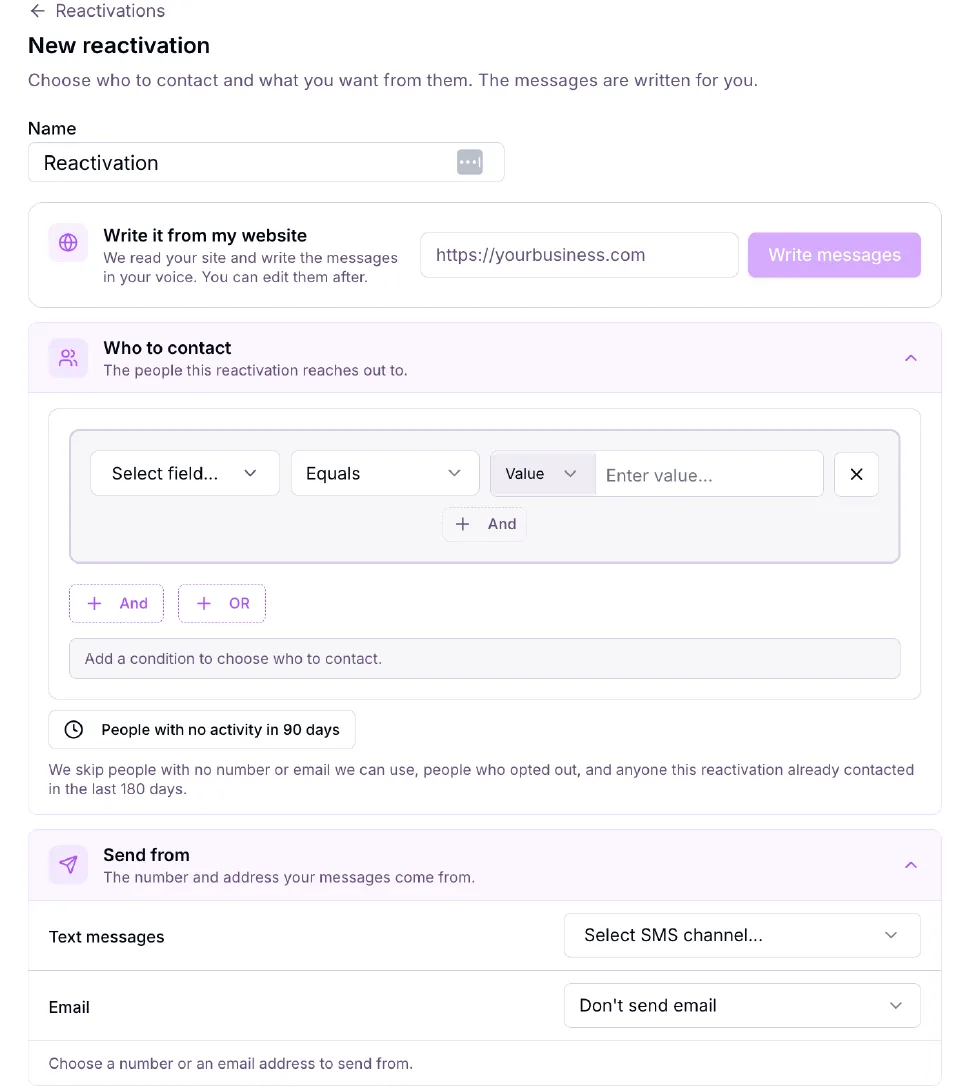
| Section | What it does | What I'd do |
|---|---|---|
| Write it from my website | Reads the client's site and writes the messages in their voice. You can edit them after. | Use it for a first draft, then rewrite the first message so it mentions the thing they asked about. |
| Who to contact | Conditions on a contact field, with And and Or. There is also a "people with no activity in 90 days" option. | Target the campaign tag you added. Use the 90-day option so you only reach people who have gone cold. |
| Send from | The SMS channel (a number) and an optional email address. | Use the client's own number. Add email as a second channel when you have good addresses. |
| Messages | A sequence of messages with a delay between each. Stops when someone replies or taps a link. | Keep the default three-step shape. Edit the wording (see the next section). |
| When they reply | Who talks to the people who answer, and what the goal is. | Start with the built-in Reactivation assistant and the "Book an appointment" goal. |
The setup screen says it skips people with no number or email it can use, people who opted out, and anyone this reactivation already contacted in the last 180 days. That helps, but it does not replace checking that the client has permission to contact the list. See the last section.
Messages, timing and speed
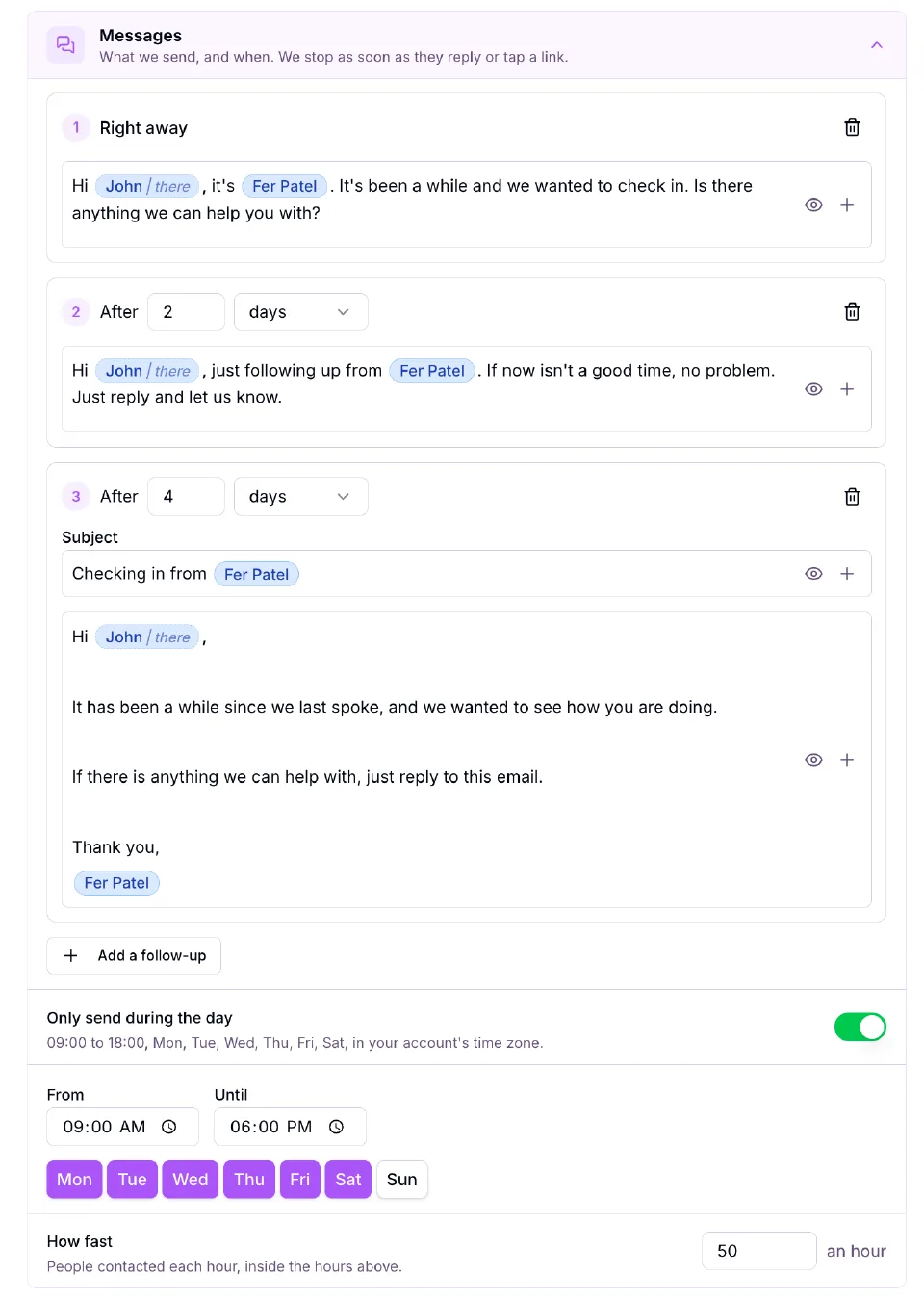
The default is three steps: a text right away, a second text after 2 days, and an email after 4 days. You can add more follow-ups, change the delays and edit every message. Two settings people miss:
- Only send during the day. On by default, 9:00 AM to 6:00 PM, Monday to Saturday, in the account's time zone. Leave it on.
- How fast. The default is 50 people an hour, inside those hours. A list of 2,000 therefore takes about four and a half days just to get the first message out. Plan your launch date around that, and don't be surprised when replies arrive in waves.
Handling replies
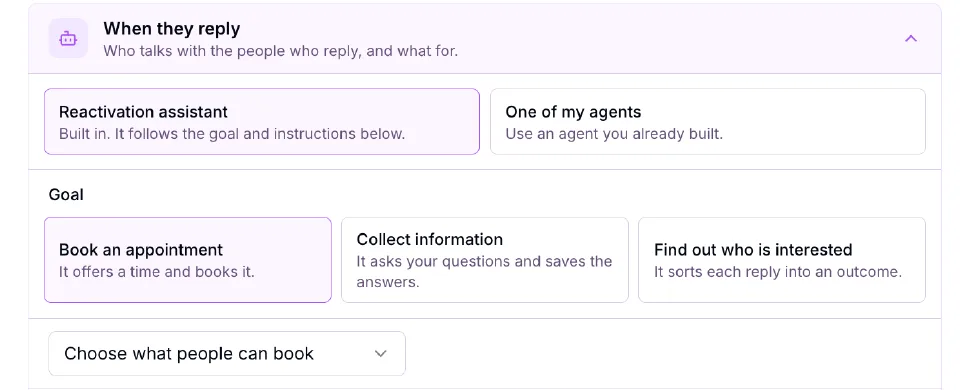
You can send replies to the built-in Reactivation assistant or to one of your own agents if you already built something better for that client. The built-in one has three goals:
- Book an appointment: it offers a time and books it. This is the one that earns you per-show fees.
- Collect information: it asks your questions and saves the answers. Good for a quote or intake first.
- Find out who is interested: it sorts each reply into an outcome. Good if the client wants to call the warm ones themselves.
For the booking goal, choose what people can book (the calendar or appointment type). Then check the instructions. Votel gives you a sensible default, and there is a "Use the suggested instructions" link if you want to reset. The default tells the assistant to find out whether the business can help, answer questions briefly and say so when it doesn't know, keep messages short and friendly, and stop when someone isn't interested or asks to stop.
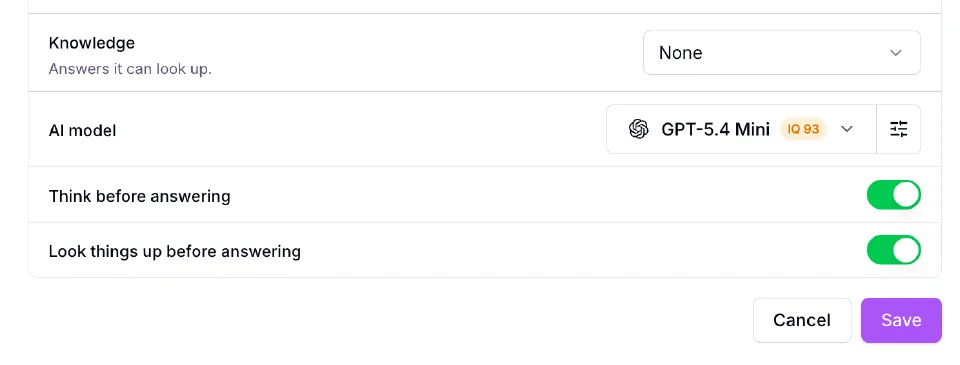
Under that you'll find Knowledge (set to None by default), the AI model, and two switches: Think before answering and Look things up before answering. Both were on in my setup. I'd add the client's FAQ or price list as Knowledge so the assistant has real answers to give, which matters a lot for a med spa fielding treatment questions.
Put your own phone number in as the only contact first and reply the way a real lead would: "how much is it?", "not right now", "STOP". Make sure each one ends the way you expect before you point it at 2,000 people.
Write messages that get replies
The default messages are fine. These are better because they mention what the person originally wanted.
The default first text reads: "Hi John, it's Fer Patel. It's been a while and we wanted to check in. Is there anything we can help you with?" That works as a safe starting point, but it gives the person no reason to answer. A good reactivation message does three things: names the business, mentions what they asked about, and makes replying easy.
Text 1, right away:
Hi [First name], it's [Name] from [Business]. You asked about [treatment] a while back and I don't think we ever got you in. Still thinking about it? Happy to find you a time that works.

Text 2, after 2 days:
Hi [First name], just following up from [Business]. If now isn't a good time, no problem. Just reply and let us know.

Email, after 4 days:
Subject: Still thinking about [treatment]?
Hi [First name],
You reached out a few months ago about [treatment]. If it's still on your mind, reply to this email and we'll find a time that suits you. If not, no hard feelings.
[Name], [Business]
Instructions for the reply assistant
Add a few lines to the default instructions so the assistant behaves like the client's front desk, not a generic bot.
This person asked about [service] in the past and never booked.
Your goal is to book a [consultation / appointment] at [Business].
Offer two specific times from the calendar. If neither works, ask what does.
Answer questions only from the knowledge provided. If you do not know, say you will have the team follow up.
Do not give medical advice, quote prices that are not in the knowledge, or promise results.
If they are not interested or ask you to stop, thank them and send nothing more.
Choose how to price it
These are example ranges, not Votel prices. Pick the model your client will actually say yes to.
- Or $50 to $200+ per show
- No upfront fee
- Client pays only for results
Easiest yes. You carry the setup cost, so keep lists small.
- Then $50 to $150 per show
- Setup covers your work
- Easy to explain
"After setup, you only pay me for the people who actually show up."
- 14 to 30 day campaign
- Predictable for both sides
- No tracking needed
Good for bigger lists. The client carries the risk, so it is a harder sell.
- Needs reliable sales tracking
- Highest ceiling
- Most disagreements
Only if you can see closed revenue and the client agrees how it is counted.
I'd start with a small setup fee and charge per show. The setup fee covers your upfront work, and the pitch is simple to say out loud. At $500 upfront and $100 per show, 20 shows makes it a $2,500 campaign.
Agree before you start what counts as a show, who confirms it (the front desk marking the appointment as attended works well) and when you invoice. Per-show pricing falls apart when nobody can say how many people came.
You have picked one model, written your numbers down, and can explain how the client pays you in one sentence.
Run the numbers
Play with the list size and your fees. Every rate below is a planning assumption you change, not a benchmark.
From a list to a fee, the chain is: people contacted, replies, bookings, shows. Each step loses some people, so the calculator lets you set each rate yourself. The defaults are a conservative guess, not a promise of what your client will see.
Your campaign fee is before your Votel plan, texting costs and your own time. The client's visit value is one visit per show, not lifetime value. If the client's average visit is worth $300 and 20 people show up, that is $6,000 of revenue from a list they had already written off.
Launch your first campaign
Five steps from "this makes sense" to the first appointments on the calendar.
1. Pick one niche where a visit is worth real money
The higher the value of one appointment, the easier the math. Med spas, dental offices, chiropractors and fitness studios are good places to start. The med spa, dental, chiropractic and fitness studio pages show how each one can use Votel.
2. Ask for the list
Ask for everyone who inquired, asked for a quote or booked once and never came back, with a name and a phone number or email. Ask how old the leads are and where they came from. Import them into the client's sub-account and tag them for this campaign.
3. Set the offer and the pricing
Pick a pricing model from above and agree on what a show is. Decide whether the message carries an incentive, such as a free consultation or a limited-time offer, and have the client confirm it in writing.
4. Build it and test it on yourself
Create the reactivation, write the messages, set the booking goal and add the client's FAQ as knowledge. Then run it against your own number and play a difficult lead.
5. Launch to a small group first
Send to a few hundred people, read every reply for two days, fix the wording, then open it to the rest of the list. Move people who book into the right pipeline stage, and tag non-responders so you can include them in a future campaign with a fresh offer. A short weekly note to the client with replies, bookings and shows keeps them on your side.
Get these right
Reactivation is powerful because it contacts real people. That makes the guardrails matter more.
Confirm the client has the right to message each person, and give a clear way to opt out. Texting rules vary by country and state, and US business texting needs registered numbers (A2P 10DLC). This is not legal advice, so check the rules where your client operates.
Response depends on the list's age, the offer and how the leads were collected. Sell the process and the pay-for-results pricing, not a guaranteed result.
Each client gets their own sub-account. Their contacts, numbers and conversations stay separate and tidy.
Leave "only send during the day" on and keep the speed modest. A reactivation that feels like spam hurts the client's number and their name.
The bigger idea
Reactivation is the first offer in this series that isn't a monthly retainer. It is a campaign you can repeat for the same client every quarter, and a natural way into the recurring services in the five-part series, like AI replies for new leads, voice AI and review requests.
Common questions
What is a database reactivation campaign?
A database reactivation campaign (DBR) is a short, structured round of outreach to people already in a business's CRM who asked about something, went quiet and never bought or booked. The business already paid to get those leads, so the aim is to turn some of them into booked appointments.
What is Votel's Reactivation Agent?
It is an agent type inside Votel's Agents & Workflows area, next to AI agents, email agents and review agents. You choose who to contact, pick the number and email address messages come from, set a sequence of messages, and choose who handles replies. Votel stops messaging a person as soon as they reply or tap a link.
Who does the Reactivation Agent skip?
Votel's setup screen says it skips people with no usable number or email, people who opted out, and anyone that reactivation already contacted in the last 180 days. It also offers a filter for people with no activity in 90 days.
How much should I charge for a reactivation campaign?
Four common models are pay per appointment ($25 to $100 per booking or $50 to $200 or more per show), setup plus performance ($500 to $1,500 upfront then $50 to $150 per show), a flat campaign fee ($1,000 to $3,000 for 14 to 30 days), and revenue share (10% to 20% of closed revenue if sales can be tracked reliably). These are examples, not Votel pricing. Price for your market.
Do I need permission to text old leads?
Yes. Only contact people the business has permission to contact, and keep a clear way for them to opt out. Texting rules differ by country and state, and US business texting also requires registered numbers (A2P 10DLC). This guide is not legal advice, so confirm with the client and check the rules where they operate.
Which Votel plan do I need to run this for clients?
Keep each client in their own sub-account so their contacts, numbers and conversations stay separate. Votel's $97 Pro plan includes five sub-accounts and the $297 Founder Unlimited plan adds unlimited sub-accounts and white labelling. Messaging usage such as texts is billed separately. Check votel.ai/pricing for current details.
How does database reactivation work with AI?
You choose a group of dormant contacts, an AI agent sends a short sequence of texts or emails, and when someone replies it answers questions and offers a time to book. In Votel, the Reactivation Agent stops messaging a person as soon as they reply or tap a link, then hands the conversation to the reply assistant or to an agent you built.
How many messages should a reactivation campaign send?
Two to four touches is plenty. Votel's default sequence is three: a text right away, a second text after 2 days and an email after 4 days. More than four messages without a reply rarely helps and raises the odds of complaints.
How old can a lead list be?
There is no fixed cutoff. Fresher leads tend to respond better, so split the list by how long people have been quiet. People gone 30 to 60 days usually need a gentle check-in, and people gone 90 days or more are better candidates for an offer with a deadline.
What results can I expect from a database reactivation campaign?
It depends on the list, the offer and how the leads were collected, so nobody can promise a number. Treat any vendor percentages you see as marketing claims. Use the calculator on this page with your own assumptions, and run a small first batch before sending to the whole list.
Which businesses are best for database reactivation?
Businesses where one visit or job is worth real money and where people inquire before they buy: med spas, dental offices, chiropractors, fitness studios, and home service companies that send quotes. The Votel for businesses pages show how each one can use Votel.
How is reactivation different from cold outreach?
The people are warm. They already asked about the service, got a quote or were customers, so the message can mention what they wanted and the business already paid to get them. That is why it is an easy offer to sell and an easier message to write.