What "one brain" actually means
A Votel agent is a single thing with a single brief. Channels are just doors into it. Whoever walks in, through a phone call or an Instagram DM, talks to the same agent that knows the same things and follows the same rules.
One prompt
Name, tone, goals and rules are written once. Every channel uses them.
One knowledge base
The website, FAQs and facts you load answer questions everywhere.
One set of workflows
Booking, routing and follow-up steps live on the same agent.
One schedule
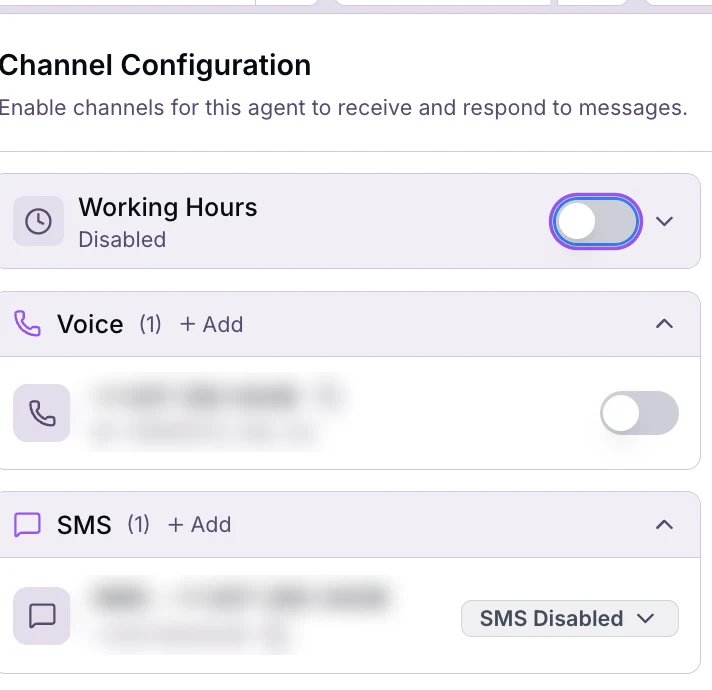
Working Hours sits at the top of the channel panel, for the whole agent.
That sounds like a small detail. It isn't. It changes three things that cost agencies real time:
- You brief it onceHoliday hours, a new service, a price change. Update the agent and every channel has it. No copying the same paragraph into three bots.
- Answers stay consistentThe caller and the person in the DMs hear the same policy, because there is only one place the policy lives.
- You test one thingWhen an answer is wrong, there's one prompt to fix and one agent to retest, not a hunt across separate builds.
One agent, one day
Here's what a single agent for a plumbing company could handle in a normal day. Same name, same knowledge, four different doors.
- 8:05 AMWhatsApp
"Do you do water heater installs?" The agent answers from the services list and offers a quote visit.
- 11:40 AMInstagram DM
Someone saw a reel and asks about pricing. Same answer as WhatsApp, because it's the same agent.
- 3:15 PMEmail
A property manager asks for availability next week. The agent replies and points to booking.
- 9:42 PMPhone call, after hours
A leak. The agent answers, takes the details, books or flags it, and the team gets the summary.
Illustration of how one agent covers several channels. What it can book or send depends on the workflows you give it.
How GHL does it, and why this is different
I spent six years at GoHighLevel (GHL) and ran special projects and AI there, so this is the comparison I get asked about most. In GHL, AI is split by product. Text channels run on Conversation AI. Phone calls run on Voice AI. AI inside automations is set up in workflows. Each one has its own setup, its own prompt and its own settings.
Separate AI per job
One agent for all of it
| What you need to do | Separate AI per channel | One Votel agent |
|---|---|---|
| Write the brief | Once per bot or agent | Once |
| Change business hours | In each place they're mentioned | In the agent |
| Add a new service | Update every bot that might be asked | Update the agent |
| Fix a wrong answer | Find which bot said it, then fix that one | Fix the prompt or knowledge, retest |
| Explain it to a client | "Your chat bot and your voice agent..." | "Your AI receptionist" |
The 14 channels one agent can take
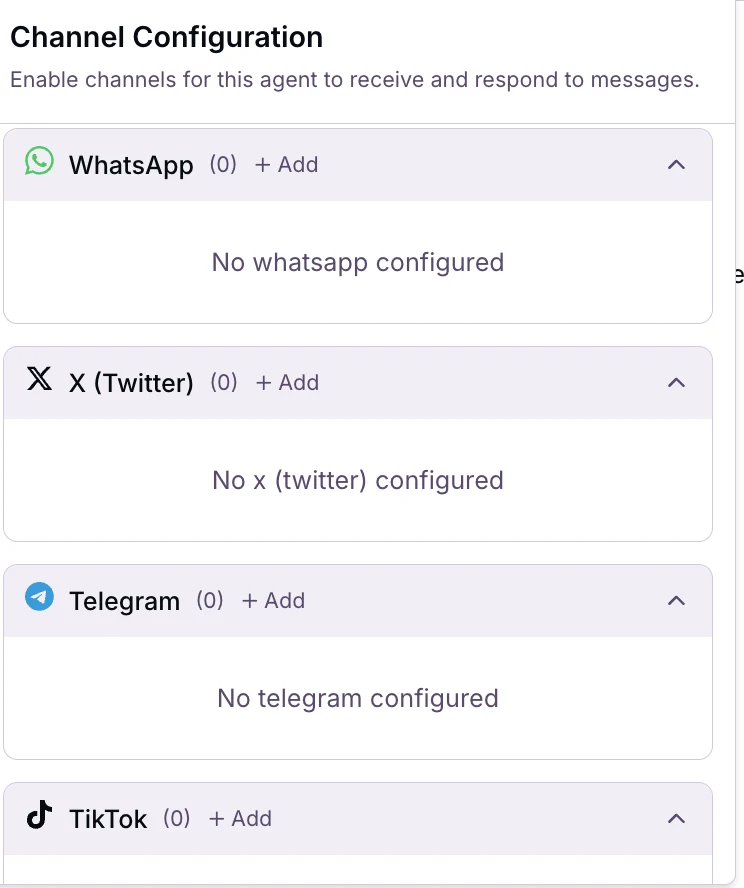
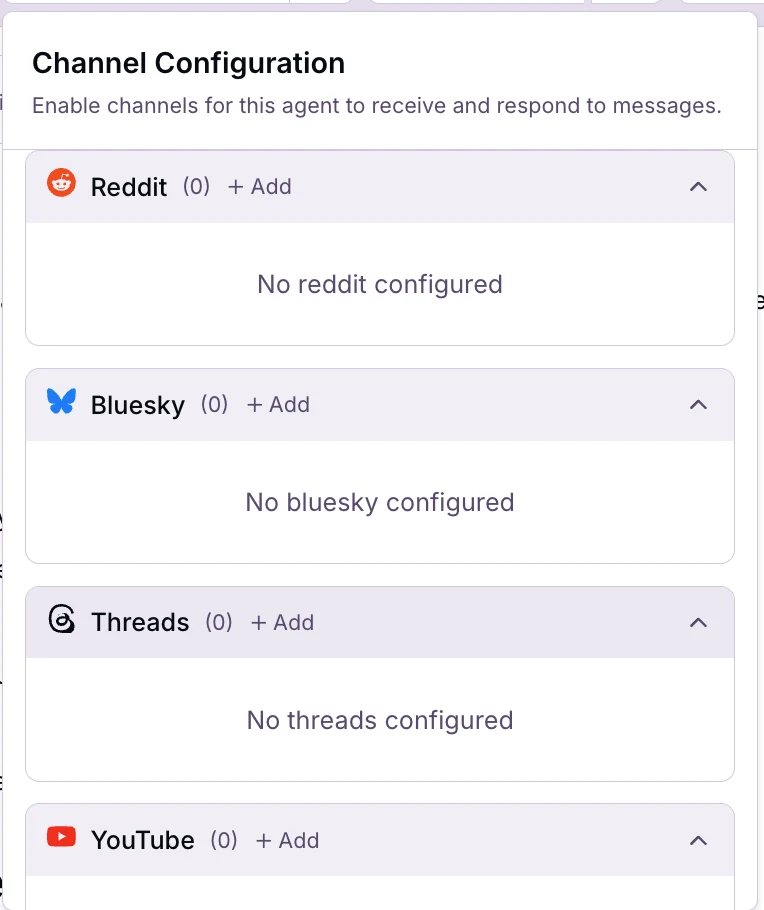
Open any agent and go to its channel settings. The panel says it plainly: "Enable channels for this agent to receive and respond to messages." Here's everything listed there.
| Channel | Group | Good for |
|---|---|---|
| Voice | Phone | Inbound calls: receptionist, after-hours answering, booking |
| SMS | Phone | Text replies, missed-call text back, quick questions |
| Inbox | Inquiries, quote requests, support questions | |
| Messaging | Customers who'd rather message than call | |
| Telegram | Messaging | Communities and markets where Telegram is the norm |
| Instagram DM | Social | Leads from reels, stories and ads |
| Facebook Messenger | Social | Page messages and Facebook ad leads |
| X (Twitter) | Social | Messages on the business's X account |
| TikTok | Social | Questions from people who found the business on TikTok |
| Social | Messages on the business's Reddit account | |
| Bluesky | Social | Messages on the business's Bluesky account |
| Threads | Social | Messages on the business's Threads account |
| YouTube | Social | Viewers who reach out from the channel |
| Social | B2B inquiries on the business's LinkedIn |
Turn channels on, one at a time
Every channel sits in the same panel on the agent. Nothing is live until you add it and switch it on.
- Open the agent's channel settingsYou'll see Working Hours at the top, then a section per channel with a count, like Voice (1) or WhatsApp (0).
- Click + Add on a channelConnect the number, inbox or account. Phone numbers and email addresses you already have in the account show up under their section.
- Switch it on for this agentVoice and email have a toggle per number or address. SMS has its own dropdown, which shows SMS Disabled until you change it.
- Set Working Hours if it mattersIt starts Disabled. Turn it on if the agent should only cover certain hours, like after-hours answering.
- Test on that channelSend a real message or make a real call from your own phone or account. A good answer on the phone doesn't prove the DM version reads well.
New to building the agent itself? Create a Votel AI agent in 5 steps covers the wizard and the workflows it builds for you.
When you'd still use more than one agent
One brain per job, not one agent for everything you'll ever do. Split when the job or the voice is genuinely different:
| Situation | Why a second agent |
|---|---|
| Different businesses | Each client gets their own agent in their own sub-account. |
| Different jobs | An inbound receptionist and an outbound reactivation campaign need different goals and rules. |
| Different brands or languages | Two brands under one owner, or a separate agent for another language, keeps each brief clean. |
| Reviews and reactivation | Votel has its own Review Agents and Reactivation Agents areas for those jobs. |
The rule I use: if two channels should give the same answer to the same question, they belong on the same agent.
How to sell one agent on every channel
Business owners don't buy "Conversation AI plus Voice AI." They buy "someone who always answers." One agent makes that pitch honest and simple:
- Sell the receptionist, not the channels. One AI receptionist that answers the phone, texts, email and DMs, with one name and one personality.
- Add channels as an upgrade. Start with phone and SMS. Add WhatsApp, Instagram and Messenger when the client sees it working. It's the same agent, so it's quick for you.
- Show the hub. The diagram at the top of this page is the pitch. Use it.
Packaging and pricing ideas are in sell it as an AI receptionist.
FAQ
Can one Votel AI agent handle voice calls and text messages?
Yes. A single Votel agent can be connected to Voice, SMS, Email and messaging and social channels from its Channel Configuration panel. It uses the same prompt, knowledge and workflows on all of them.
Which channels can a Votel agent answer on?
On November 21, 2026 the panel listed 14: Voice, SMS, Email, Instagram DM, Facebook Messenger, WhatsApp, X (Twitter), Telegram, TikTok, Reddit, Bluesky, Threads, YouTube and LinkedIn. What the agent can reply to on each platform depends on that platform, so test before you promise it.
How is this different from GoHighLevel's AI?
In GoHighLevel (GHL), text channels run on Conversation AI, phone calls run on Voice AI, and AI in automations is set up inside workflows, each with its own setup and prompt. In Votel, one agent covers all the channels with one brief.
Is a channel live as soon as I add it?
No. Each channel has to be connected and switched on for the agent. Voice and email have toggles, SMS has a dropdown that starts at SMS Disabled, and Working Hours starts Disabled too. Test each channel before a customer uses it.
Should every client have just one agent?
For most local businesses, one agent covering their inbound channels is the right start. Add a second agent when the job is different, like an outbound reactivation campaign, or when a second brand or language needs its own brief.
Build one agent. Open every door.
Create the agent once, connect phone and one messaging channel, test both, then keep adding. Votel has a 14-day trial, then plans are $97 or $297 a month.
All Things Votel is independent and not operated by or affiliated with Votel.ai. Links to Votel are affiliate links. GoHighLevel and the platform names and logos above belong to their owners. Screens and labels are from a live account on November 21, 2026 and may change.